<div class="wp-block-yoast-seo-table-of-contents yoast-table-of-contents"><h2>Inhaltsverzeichnis</h2><ul><li><a href="#title_1" data-level="2">Das richtige Material für Collagen-Kunst</a></li><li><a href="#title_2" data-level="2">Anleitung zum Collagen basteln: Drei Schritte</a></li><li><a href="#title_3" data-level="2">Step 1: Material sichten und Bilder auswählen</a></li><li><a href="#title_4" data-level="2">Step 2: Material ausschneiden und Probe legen</a></li><li><a href="#title_5" data-level="2">Step 3: Umrisse skizzieren und Motive ankleben</a></li><li><a href="#title_6" data-level="2">Sieben kreative Ideen für Collagen-Kunst</a></li><li><a href="#title_7" data-level="2">1. Collagen-Idee: Traum versus Realität</a></li><li><a href="#title_8" data-level="2">2. Collagen-Idee: Optische Täuschungen </a></li><li><a href="#title_9" data-level="2">3. Collagen-Idee: Klassiker neu interpretieren</a></li><li><a href="#title_10" data-level="2">4. Collagen-Idee: Text-Bild-Kombinationen</a></li><li><a href="#title_11" data-level="2">5. Collagen-Idee: Layering und Décollage</a></li><li><a href="#title_12" data-level="2">6. Collagen-Idee: Portrait mit Füllung</a></li><li><a href="#title_13" data-level="2">7. Collagen-Idee: Geometrische Muster als Rahmen</a></li></ul></div>


<p class="p">Bei Collagen-Kunst denken die meisten an Fotocollagen, bei denen einzelne Bilder neu angeordnet werden. Hier soll es aber nicht um klassische Fotowände gehen, sondern um gebastelte Fotomontagen. Dabei werden Teile aus mehreren Bildern ausgeschnitten und zu einem komplett neuen Bild arrangiert. Heraus kommt ein fantasievolles Kunstwerk, das sich auf Papier, Pappe oder Leinwand fixieren lässt.<br>
<br>
Klar gibt es auch technische Programme wie Photoshop, mit denen man eine digitale Compilation von Bildausschnitten erstellen kann – quasi auf Knopfdruck. Weil aber zusätzlich zur Software Spezialwissen erforderlich ist und wir mehr Lust auf etwas &#8222;Handfestes&#8220; haben, widmen wir uns hier der analogen Collagen-Kunst. Es wird also geschnitten und geklebt, was das Zeug hält.<br>
<br>
<strong>Im Video: 4 geniale Ideen, um Kinderzeichnungen stilvoll aufzuhängen</strong></p>


<div id="blocks-shortcode-input-0" class="wp-block-kaltura-video block-editor-plain-text blocks-shortcode__textarea">[kaltura-widget uiconfid="23465317" entryid="0_j3q8vpko" width="100%" height="56.25%" responsive="true" hoveringControls="true" isplaylist="" caption=" " /]</div>


<p class="p">Wem das Collage basteln schon früher im Kunstunterricht gefallen hat, der sollte jetzt aufpassen. Denn wir verraten euch, wie ihr eine <em>wirklich </em>kunstvolle Bildkomposition erschafft. Neben Beispielen von fertigen Schmuckstücken zur Inspiration versorgen wir euch mit Anleitungen und Profi-Tipps aus erster Hand.<br>
<br>
<strong>Dazu haben wir uns mit der bildenden Künstlerin <a href="https://www.carina-klein-kunst.com/" rel="do follow" target="_blank">Carina Klein</a> getroffen, </strong>deren geniale <a href="https://www.instagram.com/carina_klein_collage/" rel="do follow" target="_blank">Bildercollagen auf Instagram</a> zu bestaunen sind, und die für uns aus dem Nähkästchen geplaudert hat.</p>


<h2 class="title wp-block-heading" id="title_1">Das richtige Material für Collagen-Kunst</h2>


<p class="p">Das Wichtigste beim Collagen basteln sind genügend Bilder. <strong>Passendes Bildmaterial findet ihr in Zeitschriften – </strong>vor allem in Reise- und Fashion-Magazinen. In hochwertigen Illustrierten gibt es seitenfüllende Natur- und Landschaftsfotografien, die ihr super für eure Collagen-Kunst verwenden könnt. Auch spezielle Kunstzeitschriften belassen die Abbildungen größtenteils ohne Werbeanzeigen oder Text. Blättert euch einfach mal beim Zeitschriftenhändler eures Vertrauens durch.<br>
<br>
<strong>Tipp: </strong>Auf Flohmärkten oder in Kleinanzeigen werden oft ganze Zeitschriften-Konvolute angeboten. So erhaltet ihr für kleines Geld einen großen Fundus an Bildmaterial. Alte Bücher, Post- und Landkarten oder Notenblätter eignen sich perfekt für hübsche Vintage-Collagen.<br>
<br>
<strong>Auch lesen: </strong><a href="/wohnen/vintage-einrichtung-s4016515.html">Vintage-Einrichtung: So kombiniert ihr Flohmarkt-Möbel</a></p>


<p class="p"><strong>Im Zweifelsfall könnt ihr Bilder aus dem Internet ausdrucken. </strong>Beachtet dabei allerdings, dass Druckerpapier recht dick ist und die Farben beim Druck abweichen können.<br>
<br>
Um eurer Collage einen persönlichen Touch zu geben, könnt ihr mit eigenen Fotos arbeiten. Statt die Bilder entwickeln zu lassen, druckt ihr sie besser auf Papier. Denn echte Fotos glänzen stark. Die Lichtreflexe können später stören, wenn ihr die Collagen-Kunst aufhängen oder zur weiteren digitalen Bearbeitung einscannen wollt.</p>


<figure class="wp-block-embed is-type-rich is-provider-instagram wp-block-embed-instagram"><div class="wp-block-embed__wrapper">
<blockquote class="instagram-media cmplazyload" data-instgrm-captioned data-instgrm-permalink="https://www.instagram.com/p/CFpKrTmqxYr/?utm_source=ig_embed&;utm_campaign=loading" data-instgrm-version="14" style=" background:#FFF; border:0; border-radius:3px; box-shadow:0 0 1px 0 rgba(0,0,0,0.5),0 1px 10px 0 rgba(0,0,0,0.15); margin: 1px; max-width:658px; min-width:326px; padding:0; width:99.375%; width:-webkit-calc(100% - 2px); width:calc(100% - 2px);" data-cmp-vendor="s14" data-cmp-hide="1" class="cmplazyload"><div style="padding:16px;"> <a href="https://www.instagram.com/p/CFpKrTmqxYr/?utm_source=ig_embed&;utm_campaign=loading" style=" background:#FFFFFF; line-height:0; padding:0 0; text-align:center; text-decoration:none; width:100%;" target="_blank"> <div style=" display: flex; flex-direction: row; align-items: center;"> <div style="background-color: #F4F4F4; border-radius: 50%; flex-grow: 0; height: 40px; margin-right: 14px; width: 40px;"></div> <div style="display: flex; flex-direction: column; flex-grow: 1; justify-content: center;"> <div style=" background-color: #F4F4F4; border-radius: 4px; flex-grow: 0; height: 14px; margin-bottom: 6px; width: 100px;"></div> <div style=" background-color: #F4F4F4; border-radius: 4px; flex-grow: 0; height: 14px; width: 60px;"></div></div></div><div style="padding: 19% 0;"></div> <div style="display:block; height:50px; margin:0 auto 12px; width:50px;"><svg width="50px" height="50px" viewBox="0 0 60 60" version="1.1" xmlns="https://www.w3.org/2000/svg" xmlns:xlink="https://www.w3.org/1999/xlink"><g stroke="none" stroke-width="1" fill="none" fill-rule="evenodd"><g transform="translate(-511.000000, -20.000000)" fill="#000000"><g><path d="M556.869,30.41 C554.814,30.41 553.148,32.076 553.148,34.131 C553.148,36.186 554.814,37.852 556.869,37.852 C558.924,37.852 560.59,36.186 560.59,34.131 C560.59,32.076 558.924,30.41 556.869,30.41 M541,60.657 C535.114,60.657 530.342,55.887 530.342,50 C530.342,44.114 535.114,39.342 541,39.342 C546.887,39.342 551.658,44.114 551.658,50 C551.658,55.887 546.887,60.657 541,60.657 M541,33.886 C532.1,33.886 524.886,41.1 524.886,50 C524.886,58.899 532.1,66.113 541,66.113 C549.9,66.113 557.115,58.899 557.115,50 C557.115,41.1 549.9,33.886 541,33.886 M565.378,62.101 C565.244,65.022 564.756,66.606 564.346,67.663 C563.803,69.06 563.154,70.057 562.106,71.106 C561.058,72.155 560.06,72.803 558.662,73.347 C557.607,73.757 556.021,74.244 553.102,74.378 C549.944,74.521 548.997,74.552 541,74.552 C533.003,74.552 532.056,74.521 528.898,74.378 C525.979,74.244 524.393,73.757 523.338,73.347 C521.94,72.803 520.942,72.155 519.894,71.106 C518.846,70.057 518.197,69.06 517.654,67.663 C517.244,66.606 516.755,65.022 516.623,62.101 C516.479,58.943 516.448,57.996 516.448,50 C516.448,42.003 516.479,41.056 516.623,37.899 C516.755,34.978 517.244,33.391 517.654,32.338 C518.197,30.938 518.846,29.942 519.894,28.894 C520.942,27.846 521.94,27.196 523.338,26.654 C524.393,26.244 525.979,25.756 528.898,25.623 C532.057,25.479 533.004,25.448 541,25.448 C548.997,25.448 549.943,25.479 553.102,25.623 C556.021,25.756 557.607,26.244 558.662,26.654 C560.06,27.196 561.058,27.846 562.106,28.894 C563.154,29.942 563.803,30.938 564.346,32.338 C564.756,33.391 565.244,34.978 565.378,37.899 C565.522,41.056 565.552,42.003 565.552,50 C565.552,57.996 565.522,58.943 565.378,62.101 M570.82,37.631 C570.674,34.438 570.167,32.258 569.425,30.349 C568.659,28.377 567.633,26.702 565.965,25.035 C564.297,23.368 562.623,22.342 560.652,21.575 C558.743,20.834 556.562,20.326 553.369,20.18 C550.169,20.033 549.148,20 541,20 C532.853,20 531.831,20.033 528.631,20.18 C525.438,20.326 523.257,20.834 521.349,21.575 C519.376,22.342 517.703,23.368 516.035,25.035 C514.368,26.702 513.342,28.377 512.574,30.349 C511.834,32.258 511.326,34.438 511.181,37.631 C511.035,40.831 511,41.851 511,50 C511,58.147 511.035,59.17 511.181,62.369 C511.326,65.562 511.834,67.743 512.574,69.651 C513.342,71.625 514.368,73.296 516.035,74.965 C517.703,76.634 519.376,77.658 521.349,78.425 C523.257,79.167 525.438,79.673 528.631,79.82 C531.831,79.965 532.853,80.001 541,80.001 C549.148,80.001 550.169,79.965 553.369,79.82 C556.562,79.673 558.743,79.167 560.652,78.425 C562.623,77.658 564.297,76.634 565.965,74.965 C567.633,73.296 568.659,71.625 569.425,69.651 C570.167,67.743 570.674,65.562 570.82,62.369 C570.966,59.17 571,58.147 571,50 C571,41.851 570.966,40.831 570.82,37.631"></path></g></g></g></svg></div><div style="padding-top: 8px;"> <div style=" color:#3897f0; font-family:Arial,sans-serif; font-size:14px; font-style:normal; font-weight:550; line-height:18px;">View this post on Instagram</div></div><div style="padding: 12.5% 0;"></div> <div style="display: flex; flex-direction: row; margin-bottom: 14px; align-items: center;"><div> <div style="background-color: #F4F4F4; border-radius: 50%; height: 12.5px; width: 12.5px; transform: translateX(0px) translateY(7px);"></div> <div style="background-color: #F4F4F4; height: 12.5px; transform: rotate(-45deg) translateX(3px) translateY(1px); width: 12.5px; flex-grow: 0; margin-right: 14px; margin-left: 2px;"></div> <div style="background-color: #F4F4F4; border-radius: 50%; height: 12.5px; width: 12.5px; transform: translateX(9px) translateY(-18px);"></div></div><div style="margin-left: 8px;"> <div style=" background-color: #F4F4F4; border-radius: 50%; flex-grow: 0; height: 20px; width: 20px;"></div> <div style=" width: 0; height: 0; border-top: 2px solid transparent; border-left: 6px solid #f4f4f4; border-bottom: 2px solid transparent; transform: translateX(16px) translateY(-4px) rotate(30deg)"></div></div><div style="margin-left: auto;"> <div style=" width: 0px; border-top: 8px solid #F4F4F4; border-right: 8px solid transparent; transform: translateY(16px);"></div> <div style=" background-color: #F4F4F4; flex-grow: 0; height: 12px; width: 16px; transform: translateY(-4px);"></div> <div style=" width: 0; height: 0; border-top: 8px solid #F4F4F4; border-left: 8px solid transparent; transform: translateY(-4px) translateX(8px);"></div></div></div> <div style="display: flex; flex-direction: column; flex-grow: 1; justify-content: center; margin-bottom: 24px;"> <div style=" background-color: #F4F4F4; border-radius: 4px; flex-grow: 0; height: 14px; margin-bottom: 6px; width: 224px;"></div> <div style=" background-color: #F4F4F4; border-radius: 4px; flex-grow: 0; height: 14px; width: 144px;"></div></div></a><p style=" color:#c9c8cd; font-family:Arial,sans-serif; font-size:14px; line-height:17px; margin-bottom:0; margin-top:8px; overflow:hidden; padding:8px 0 7px; text-align:center; text-overflow:ellipsis; white-space:nowrap;"><a href="https://www.instagram.com/p/CFpKrTmqxYr/?utm_source=ig_embed&;utm_campaign=loading" style=" color:#c9c8cd; font-family:Arial,sans-serif; font-size:14px; font-style:normal; font-weight:normal; line-height:17px; text-decoration:none;" target="_blank">A post shared by Carina Klein | COLLAGE (@carina_klein_collage)</a></p></div></blockquote><script async data-cmp-src="//platform.instagram.com/en_US/embeds.js" src="about:blank" data-cmp-vendor="s14" data-cmp-preview="520x200" class="cmplazyload"></script>
</div></figure>


<p class="p"><strong>Neben dem Bildmaterial braucht ihr folgendes Werkzeug:</strong>
</p>


<ul>
<li>Unterlage zum Schneiden <a href="https://amzn.to/2HqV335" target="_blank" rel="noopener">(hier bei Amazon)</a>*</li>


<li>Schere</li>


<li>Cuttermesser (oder Skalpell, <a href="https://amzn.to/37wUuzk" target="_blank" rel="noopener">hier bei Amazon</a>)*</li>


<li>Pinzette für kleine Teile</li>


<li>Klebestift</li>


<li>Fotoklebeecken <a href="https://amzn.to/2HfrscY" target="_blank" rel="noopener">(hier bei Amazon)</a>*</li>
</ul>


<p>
<strong>Tipp: </strong>Damit die Collage weniger eindimensional ist, könnt ihr neben Fotomaterial kleine Naturgegenstände integrieren. Federn, Blätter oder <a href="/wohnen/blumen-pressen-methoden-mit-erfolgsgarantie-s4009241.html">gepresste Blumen</a> machen das Kunstobjekt plastischer.</p>


<h2 class="title wp-block-heading" id="title_2">Anleitung zum Collagen basteln: Drei Schritte</h2>


<p class="p">Auf dem Weg zur fertigen Collage müsst ihr eigentlich nur drei Arbeitsschritten folgen. Welche das sind und worauf ihr jeweils achten solltet, erfahrt ihr hier.</p>


<figure class="wp-block-image size-large"><img height="1024" width="745" src="https://dev.gofeminin.de/wp-content/uploads/sites/2/2022/11/2092595_w800h1100cx400cy550cxt0cyt0cxb800cyb1100.jpg" alt="Für selbstgemachte Collagen-Kunst braucht ihr vor allem etwas Geduld" class="wp-image-21433" title="Für selbstgemachte Collagen-Kunst braucht ihr vor allem etwas Geduld" /><figcaption><span class="image-credit"><span class="credit-label-wrapper">Credit:</span> Carina Klein</span></figcaption></figure>


<h2 class="title wp-block-heading" id="title_3">Step 1: Material sichten und Bilder auswählen</h2>


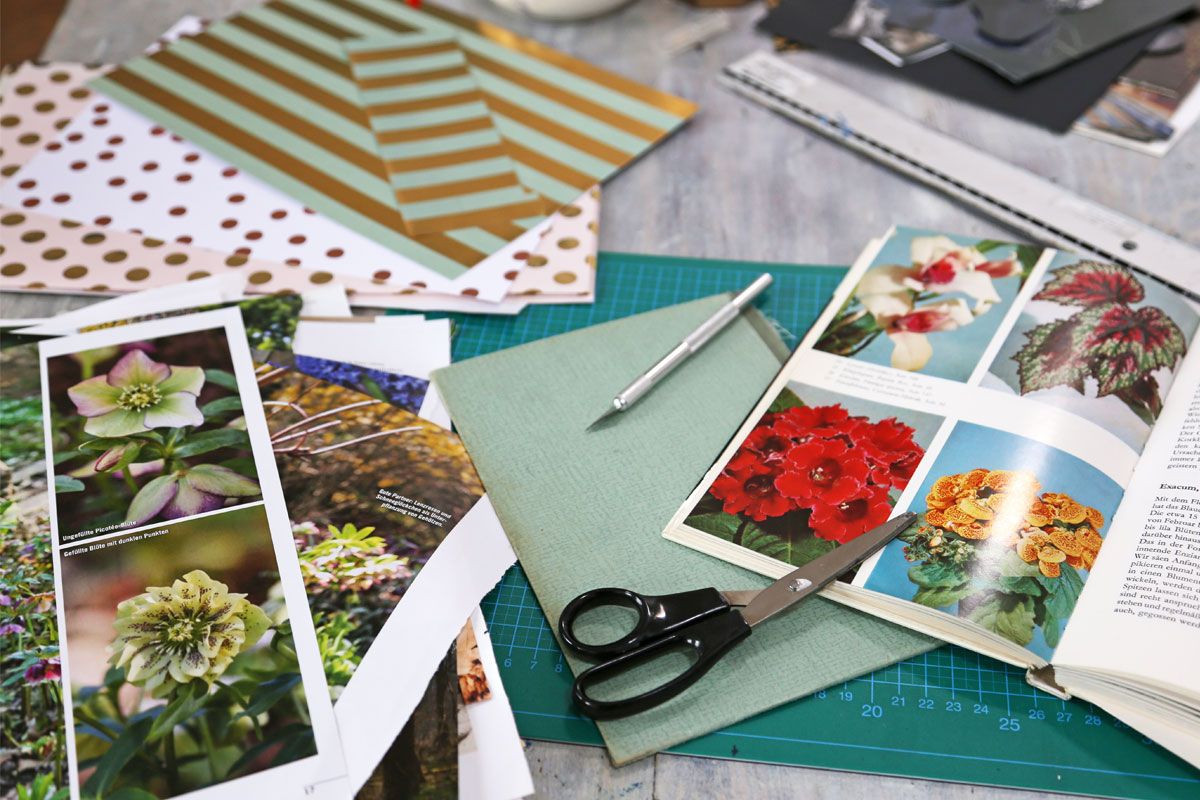
<p class="p">Zunächst plant ihr die Bildercollage im Kopf. Sichtet dafür Kataloge oder alte Bücher und überlegt, welche Motive farblich und inhaltlich gut zusammenpassen würden. Profis geben ihrem Projekt ein bestimmtes Thema. Künstlerisch wertvoll ist beispielsweise das Vanitas-Vergänglichkeitssujet.<br>
<br>
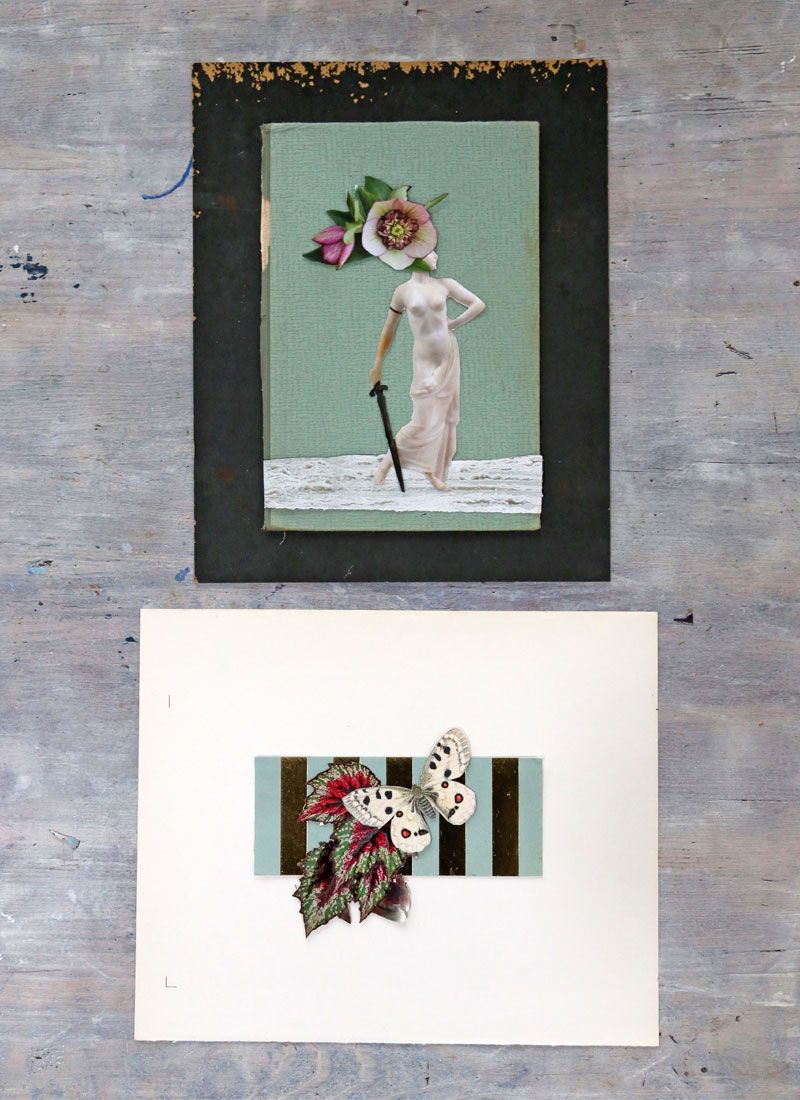
Wenn, wie beim Beispiel der Frauenstatue oben, Personen eine tragende Rolle spielen, gibt Künstlerin Carina zu bedenken, je nach Körperhaltung einen Untergrund für die Füße einzuplanen. Ermöglicht es die Armposition, lassen sich der Figur zudem Gegenstände in die Hände legen. Notfalls müsst ihr für den Griff einzelne Finger abtrennen.<br>
<br>
<strong>Tipp: </strong>Anders als in der klassischen Malerei könnt ihr euren Bildmittelpunkt natürlich auch einfach im luftleeren Raum schweben lassen. Landschaften könnt ihr genauso gut auf den Kopf stellen, sodass der Boden als Himmel auf eure Figur hinabschaut. Verkehrte Welt – bei der Collagen-Technik ist alles erlaubt. Wichtig ist, dass ihr für euch selbst festlegt, ob ihr es eher realistisch oder fantastisch haben wollt.</p>


<figure class="wp-block-image size-large"><img height="683" width="1024" src="https://dev.gofeminin.de/wp-content/uploads/sites/2/2022/11/2092416_w1200h800cx600cy400cxt0cyt0cxb1200cyb800.jpg" alt="Erster Schritt der Collagen-Kunst: Zeitschriften mit passenden Motiven sammeln" class="wp-image-21434" title="Erster Schritt der Collagen-Kunst: Zeitschriften mit passenden Motiven sammeln" /><figcaption><span class="image-credit"><span class="credit-label-wrapper">Credit:</span> Carina Klein</span></figcaption></figure>


<p class="p">Als Hintergrund muss es kein vollständiges Landschaftsmotiv sein. Es genügen einzelne Elemente, die ihr im Anschluss auf einem weißen oder farbigen Papier anbringt. Unterschiedliche Texturen sind ausdrücklich erwünscht.</p>


<h2 class="title wp-block-heading" id="title_4">Step 2: Material ausschneiden und Probe legen</h2>


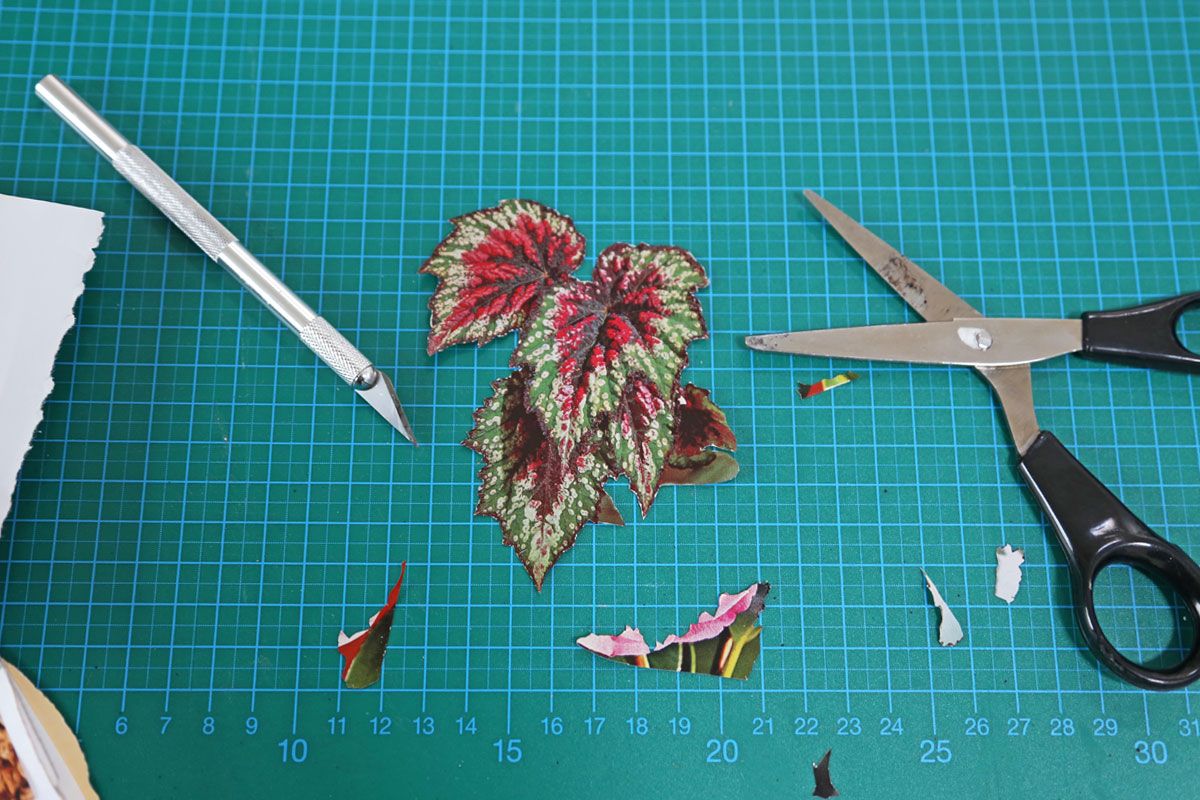
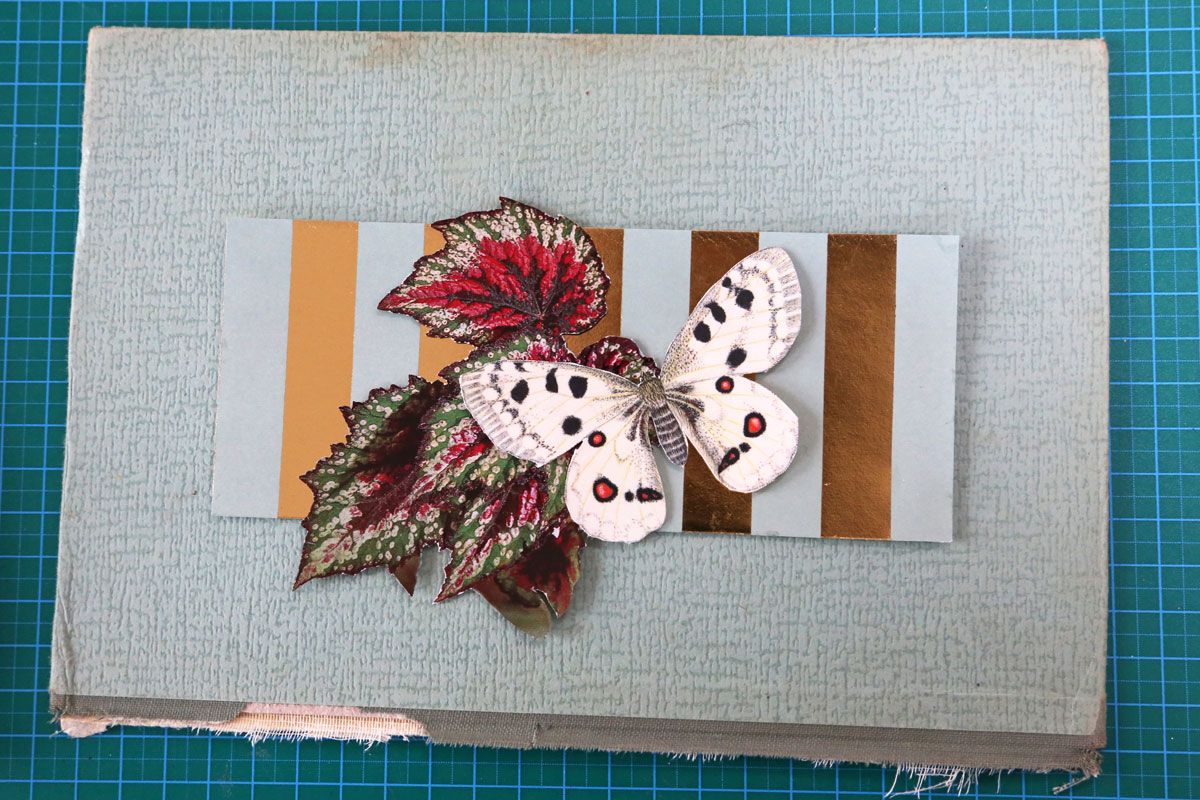
<p class="p">Im nächsten Schritt geht es ans Ausschneiden der ausgewählten Bildelemente. Großflächige Teile, wie hier die Statue oder der Schmetterling, lassen sich bequem mit einer sauberen Bastelschere herausschnippeln.<br>
<br>
Für Engstellen oder Zwischenräume, wie bei den Blattspitzen, benutzt ihr am besten einen Cutter oder ein Skalpell mit feiner scharfer Schneide. Legt die Seite oder das grob vorgeschnittene Motiv auf eine schnittfeste Unterlage (es reicht ein Stück Karton) und zeichnet die Konturen mit der Klinge nach. Geduld – je sauberer ihr arbeitet, umso schöner wird eure Collagen-Kunst!</p>


<figure class="wp-block-image size-large"><img height="683" width="1024" src="https://dev.gofeminin.de/wp-content/uploads/sites/2/2022/11/2092629_w1200h800cx600cy400cxt0cyt0cxb1200cyb800.jpg" alt="Zweiter Schritt der Collagen-Kunst: Die einzelnen Motive ausschneiden" class="wp-image-21435" title="Zweiter Schritt der Collagen-Kunst: Die einzelnen Motive ausschneiden" /><figcaption><span class="image-credit"><span class="credit-label-wrapper">Credit:</span> Carina Klein</span></figcaption></figure>


<p class="p">Die ausgeschnittenen Teile könnt ihr entweder in einem Umschlag für spätere Projekte sammeln und aufbewahren oder gleich daraus eine Collage basteln.<br>
<br>
Bevor ihr die Formen fixiert, solltet ihr die losen Einzelteile Probe legen. Zufrieden mit der Anordnung? <strong>Dann fixiert die Motive mit Kreppklebeband </strong>– das hat gegenüber Tesafilm den Vorteil, dass es sich leicht und spurlos lösen lässt, sollten noch Änderungen nötig sein.<br>
<br>
<strong>Tipp: </strong>Winzige Motive bekommt ihr mit einer Pinzette gepackt. Ihr könnt sie vorsorglich mit Stecknadeln an Ort und Stelle sichern, damit nicht versehentlich alles beim Ausatmen verrutscht.</p>


<h2 class="title wp-block-heading" id="title_5">Step 3: Umrisse skizzieren und Motive ankleben</h2>


<p class="p">Im letzten Schritt beim Collage basteln wird die Compilation endgültig zusammengefügt. Habt ihr viele sich überlappende Schichten, solltet ihr mit den oberen Ebenen beginnen. Hebt die lose aufliegenden ersten beiden Elemente ab und bestreicht die Unterseite des Oberen dünn mit Klebestift – nur dort, wo es das untere Element berührt. So vermeidet ihr unschöne Klebestellen.<br>
<br>
<strong>Wichtig: </strong>Benutzt keinen Flüssigkleber, denn der durchnässt das Papier und lässt es wellen. Bei größeren Kontaktstellen könnt ihr auch Klebeecken benutzen, mit denen man Fotos ins Album klebt. Achtet bei Klebestiften darauf, keine Stückchen einzuarbeiten. Die sind später als Hubbel unter dem Blatt sichtbar.</p>


<figure class="wp-block-image size-large"><img height="683" width="1024" src="https://dev.gofeminin.de/wp-content/uploads/sites/2/2022/11/2092417_w1200h800cx600cy400cxt0cyt0cxb1200cyb800.jpg" alt="Dritter Schritt der Collagen-Kunst: Motive festkleben" class="wp-image-21436" title="Dritter Schritt der Collagen-Kunst: Motive festkleben" /><figcaption><span class="image-credit"><span class="credit-label-wrapper">Credit:</span> Carina Klein</span></figcaption></figure>


<p class="p">Flächige Bestandteile, wie in den Beispielen die gestreifte Bordüre oder das Meer unter der Statue, könnt ihr sofort auf euren Hintergrund übertragen. Darauf folgen nun nach den Regeln der Verdeckung die nächsten Bildschichten. Habt ihr euch dagegen entschieden, vorher einzelne Bilddetails miteinander zu verknüpfen, könnt ihr die Klebeposition mit einem Bleistiftkreuz markieren.<br>
<br>
Lasst der fertigen Collagen etwas Zeit, sich zu setzen. Selbst Klebestifte brauchen einen Moment, um zu trocknen. Anschließend könnt ihr euer geschaffenes Unikat einrahmen und aufhängen.<br>
<br>
<strong>Lesestoff:</strong> <a href="/wohnen/bilderrahmen-selber-machen-s2074861.html">Bilderrahmen selber machen: Originelle DIY-Ideen für Fotos</a></p>


<h2 class="title wp-block-heading" id="title_6">Sieben kreative Ideen für Collagen-Kunst</h2>


<p class="p">Wie immer im Leben gilt auch bei der Collagen-Kunst: Übung macht den Meister. Lasst euch nicht von ein paar ungeschickten ersten Versuchen verunsichern. Bleibt am Ball und heftet fleißig Zeitschriftenseiten für später ab – wer sammelt, hat eine größere Auswahl zur Verfügung.<br>
<br>
Weil es als Inspiration manchmal schon genügt, zu sehen, was alles möglich ist, präsentieren wir euch hier einige unserer ausgewählten Lieblingscollagen. An konkreten Bildern lässt sich schließlich am besten verdeutlichen, worauf es bei einer guten Bildercollage ankommt.</p>


<h2 class="title wp-block-heading" id="title_7">1. Collagen-Idee: Traum versus Realität</h2>


<p class="p">Einer der berühmtesten Collagen-Künstler ist Frank Moth. Von seinen fantasievollen Fotomontagen gibt es längst Poster und Kunstdrucke bei Händlern wie Juniqe <a href="https://www.awin1.com/cread.php?awinmid=13927&;awinaffid=614159&;clickref=gf-s-4018611-21&;ued=https%3A%2F%2Fwww.juniqe.de%2Ffrank-moth%3Fgclid%3DCj0KCQjw28T8BRDbARIsAEOMBczRFZXqlNpXFEZ4euYK4j9oNzgwiw5lMqPBHZStoD6sO0RxiQNIEasaArXiEALw_wcB" target="_blank" rel="noopener">(hier Designs von Frank Moth shoppen)</a>*. Was seine Collagen so besonders macht, ist die Verbindung von Traum und Realität. Auch wenn er die Bilder digital herstellt, kann man das Prinzip auch analog nachahmen.</p>


<figure class="wp-block-embed is-type-rich is-provider-instagram wp-block-embed-instagram"><div class="wp-block-embed__wrapper">
<blockquote class="instagram-media cmplazyload" data-instgrm-captioned data-instgrm-permalink="https://www.instagram.com/p/CGc7vCUA7DY/?utm_source=ig_embed&;utm_campaign=loading" data-instgrm-version="14" style=" background:#FFF; border:0; border-radius:3px; box-shadow:0 0 1px 0 rgba(0,0,0,0.5),0 1px 10px 0 rgba(0,0,0,0.15); margin: 1px; max-width:658px; min-width:326px; padding:0; width:99.375%; width:-webkit-calc(100% - 2px); width:calc(100% - 2px);" data-cmp-vendor="s14" data-cmp-hide="1" class="cmplazyload"><div style="padding:16px;"> <a href="https://www.instagram.com/p/CGc7vCUA7DY/?utm_source=ig_embed&;utm_campaign=loading" style=" background:#FFFFFF; line-height:0; padding:0 0; text-align:center; text-decoration:none; width:100%;" target="_blank"> <div style=" display: flex; flex-direction: row; align-items: center;"> <div style="background-color: #F4F4F4; border-radius: 50%; flex-grow: 0; height: 40px; margin-right: 14px; width: 40px;"></div> <div style="display: flex; flex-direction: column; flex-grow: 1; justify-content: center;"> <div style=" background-color: #F4F4F4; border-radius: 4px; flex-grow: 0; height: 14px; margin-bottom: 6px; width: 100px;"></div> <div style=" background-color: #F4F4F4; border-radius: 4px; flex-grow: 0; height: 14px; width: 60px;"></div></div></div><div style="padding: 19% 0;"></div> <div style="display:block; height:50px; margin:0 auto 12px; width:50px;"><svg width="50px" height="50px" viewBox="0 0 60 60" version="1.1" xmlns="https://www.w3.org/2000/svg" xmlns:xlink="https://www.w3.org/1999/xlink"><g stroke="none" stroke-width="1" fill="none" fill-rule="evenodd"><g transform="translate(-511.000000, -20.000000)" fill="#000000"><g><path d="M556.869,30.41 C554.814,30.41 553.148,32.076 553.148,34.131 C553.148,36.186 554.814,37.852 556.869,37.852 C558.924,37.852 560.59,36.186 560.59,34.131 C560.59,32.076 558.924,30.41 556.869,30.41 M541,60.657 C535.114,60.657 530.342,55.887 530.342,50 C530.342,44.114 535.114,39.342 541,39.342 C546.887,39.342 551.658,44.114 551.658,50 C551.658,55.887 546.887,60.657 541,60.657 M541,33.886 C532.1,33.886 524.886,41.1 524.886,50 C524.886,58.899 532.1,66.113 541,66.113 C549.9,66.113 557.115,58.899 557.115,50 C557.115,41.1 549.9,33.886 541,33.886 M565.378,62.101 C565.244,65.022 564.756,66.606 564.346,67.663 C563.803,69.06 563.154,70.057 562.106,71.106 C561.058,72.155 560.06,72.803 558.662,73.347 C557.607,73.757 556.021,74.244 553.102,74.378 C549.944,74.521 548.997,74.552 541,74.552 C533.003,74.552 532.056,74.521 528.898,74.378 C525.979,74.244 524.393,73.757 523.338,73.347 C521.94,72.803 520.942,72.155 519.894,71.106 C518.846,70.057 518.197,69.06 517.654,67.663 C517.244,66.606 516.755,65.022 516.623,62.101 C516.479,58.943 516.448,57.996 516.448,50 C516.448,42.003 516.479,41.056 516.623,37.899 C516.755,34.978 517.244,33.391 517.654,32.338 C518.197,30.938 518.846,29.942 519.894,28.894 C520.942,27.846 521.94,27.196 523.338,26.654 C524.393,26.244 525.979,25.756 528.898,25.623 C532.057,25.479 533.004,25.448 541,25.448 C548.997,25.448 549.943,25.479 553.102,25.623 C556.021,25.756 557.607,26.244 558.662,26.654 C560.06,27.196 561.058,27.846 562.106,28.894 C563.154,29.942 563.803,30.938 564.346,32.338 C564.756,33.391 565.244,34.978 565.378,37.899 C565.522,41.056 565.552,42.003 565.552,50 C565.552,57.996 565.522,58.943 565.378,62.101 M570.82,37.631 C570.674,34.438 570.167,32.258 569.425,30.349 C568.659,28.377 567.633,26.702 565.965,25.035 C564.297,23.368 562.623,22.342 560.652,21.575 C558.743,20.834 556.562,20.326 553.369,20.18 C550.169,20.033 549.148,20 541,20 C532.853,20 531.831,20.033 528.631,20.18 C525.438,20.326 523.257,20.834 521.349,21.575 C519.376,22.342 517.703,23.368 516.035,25.035 C514.368,26.702 513.342,28.377 512.574,30.349 C511.834,32.258 511.326,34.438 511.181,37.631 C511.035,40.831 511,41.851 511,50 C511,58.147 511.035,59.17 511.181,62.369 C511.326,65.562 511.834,67.743 512.574,69.651 C513.342,71.625 514.368,73.296 516.035,74.965 C517.703,76.634 519.376,77.658 521.349,78.425 C523.257,79.167 525.438,79.673 528.631,79.82 C531.831,79.965 532.853,80.001 541,80.001 C549.148,80.001 550.169,79.965 553.369,79.82 C556.562,79.673 558.743,79.167 560.652,78.425 C562.623,77.658 564.297,76.634 565.965,74.965 C567.633,73.296 568.659,71.625 569.425,69.651 C570.167,67.743 570.674,65.562 570.82,62.369 C570.966,59.17 571,58.147 571,50 C571,41.851 570.966,40.831 570.82,37.631"></path></g></g></g></svg></div><div style="padding-top: 8px;"> <div style=" color:#3897f0; font-family:Arial,sans-serif; font-size:14px; font-style:normal; font-weight:550; line-height:18px;">View this post on Instagram</div></div><div style="padding: 12.5% 0;"></div> <div style="display: flex; flex-direction: row; margin-bottom: 14px; align-items: center;"><div> <div style="background-color: #F4F4F4; border-radius: 50%; height: 12.5px; width: 12.5px; transform: translateX(0px) translateY(7px);"></div> <div style="background-color: #F4F4F4; height: 12.5px; transform: rotate(-45deg) translateX(3px) translateY(1px); width: 12.5px; flex-grow: 0; margin-right: 14px; margin-left: 2px;"></div> <div style="background-color: #F4F4F4; border-radius: 50%; height: 12.5px; width: 12.5px; transform: translateX(9px) translateY(-18px);"></div></div><div style="margin-left: 8px;"> <div style=" background-color: #F4F4F4; border-radius: 50%; flex-grow: 0; height: 20px; width: 20px;"></div> <div style=" width: 0; height: 0; border-top: 2px solid transparent; border-left: 6px solid #f4f4f4; border-bottom: 2px solid transparent; transform: translateX(16px) translateY(-4px) rotate(30deg)"></div></div><div style="margin-left: auto;"> <div style=" width: 0px; border-top: 8px solid #F4F4F4; border-right: 8px solid transparent; transform: translateY(16px);"></div> <div style=" background-color: #F4F4F4; flex-grow: 0; height: 12px; width: 16px; transform: translateY(-4px);"></div> <div style=" width: 0; height: 0; border-top: 8px solid #F4F4F4; border-left: 8px solid transparent; transform: translateY(-4px) translateX(8px);"></div></div></div> <div style="display: flex; flex-direction: column; flex-grow: 1; justify-content: center; margin-bottom: 24px;"> <div style=" background-color: #F4F4F4; border-radius: 4px; flex-grow: 0; height: 14px; margin-bottom: 6px; width: 224px;"></div> <div style=" background-color: #F4F4F4; border-radius: 4px; flex-grow: 0; height: 14px; width: 144px;"></div></div></a><p style=" color:#c9c8cd; font-family:Arial,sans-serif; font-size:14px; line-height:17px; margin-bottom:0; margin-top:8px; overflow:hidden; padding:8px 0 7px; text-align:center; text-overflow:ellipsis; white-space:nowrap;"><a href="https://www.instagram.com/p/CGc7vCUA7DY/?utm_source=ig_embed&;utm_campaign=loading" style=" color:#c9c8cd; font-family:Arial,sans-serif; font-size:14px; font-style:normal; font-weight:normal; line-height:17px; text-decoration:none;" target="_blank">A post shared by Frank Moth Art (@frankmoth)</a></p></div></blockquote><script async data-cmp-src="//platform.instagram.com/en_US/embeds.js" src="about:blank" data-cmp-vendor="s14" data-cmp-preview="520x200" class="cmplazyload"></script>
</div></figure>


<p class="p">Den traumhaften Effekt erreicht ihr durch die Verbindung eines Galaxie-Hintergrunds mit Motiven von realen Landschaften oder Personen im Vordergrund. Futuristische Galaxy-Bilder sind zurzeit schwer angesagt – gerne im Pop-Mix mit nostalgischen Szenarien im Look der 50er oder 20er Jahre.</p>


<h2 class="title wp-block-heading" id="title_8">2. Collagen-Idee: Optische Täuschungen </h2>


<p class="p">Fotomontagen sind eng mit optischen Illusionen verwandt. Durch den Wechsel von einem Kontext in den anderen, kann sich die Bedeutung des Inhalts drastisch verändern. Am meisten Spaß macht das, wenn das aus dem Zusammenhang gerissene Motiv mit der neuen Kulisse interagiert.<br>
<br>
Damit der Trick gelingt, solltet ihr die Größenverhältnisse von Vordergrund und Hintergrund respektieren: Was vorne im Bild zu sehen ist, ist perspektivisch größer als das, was sich dahinter abspielt.</p>


<figure class="wp-block-embed is-type-rich is-provider-instagram wp-block-embed-instagram"><div class="wp-block-embed__wrapper">
<blockquote class="instagram-media cmplazyload" data-instgrm-captioned data-instgrm-permalink="https://www.instagram.com/p/CERhuWYhJzG/?utm_source=ig_embed&;utm_campaign=loading" data-instgrm-version="14" style=" background:#FFF; border:0; border-radius:3px; box-shadow:0 0 1px 0 rgba(0,0,0,0.5),0 1px 10px 0 rgba(0,0,0,0.15); margin: 1px; max-width:658px; min-width:326px; padding:0; width:99.375%; width:-webkit-calc(100% - 2px); width:calc(100% - 2px);" data-cmp-vendor="s14" data-cmp-hide="1" class="cmplazyload"><div style="padding:16px;"> <a href="https://www.instagram.com/p/CERhuWYhJzG/?utm_source=ig_embed&;utm_campaign=loading" style=" background:#FFFFFF; line-height:0; padding:0 0; text-align:center; text-decoration:none; width:100%;" target="_blank"> <div style=" display: flex; flex-direction: row; align-items: center;"> <div style="background-color: #F4F4F4; border-radius: 50%; flex-grow: 0; height: 40px; margin-right: 14px; width: 40px;"></div> <div style="display: flex; flex-direction: column; flex-grow: 1; justify-content: center;"> <div style=" background-color: #F4F4F4; border-radius: 4px; flex-grow: 0; height: 14px; margin-bottom: 6px; width: 100px;"></div> <div style=" background-color: #F4F4F4; border-radius: 4px; flex-grow: 0; height: 14px; width: 60px;"></div></div></div><div style="padding: 19% 0;"></div> <div style="display:block; height:50px; margin:0 auto 12px; width:50px;"><svg width="50px" height="50px" viewBox="0 0 60 60" version="1.1" xmlns="https://www.w3.org/2000/svg" xmlns:xlink="https://www.w3.org/1999/xlink"><g stroke="none" stroke-width="1" fill="none" fill-rule="evenodd"><g transform="translate(-511.000000, -20.000000)" fill="#000000"><g><path d="M556.869,30.41 C554.814,30.41 553.148,32.076 553.148,34.131 C553.148,36.186 554.814,37.852 556.869,37.852 C558.924,37.852 560.59,36.186 560.59,34.131 C560.59,32.076 558.924,30.41 556.869,30.41 M541,60.657 C535.114,60.657 530.342,55.887 530.342,50 C530.342,44.114 535.114,39.342 541,39.342 C546.887,39.342 551.658,44.114 551.658,50 C551.658,55.887 546.887,60.657 541,60.657 M541,33.886 C532.1,33.886 524.886,41.1 524.886,50 C524.886,58.899 532.1,66.113 541,66.113 C549.9,66.113 557.115,58.899 557.115,50 C557.115,41.1 549.9,33.886 541,33.886 M565.378,62.101 C565.244,65.022 564.756,66.606 564.346,67.663 C563.803,69.06 563.154,70.057 562.106,71.106 C561.058,72.155 560.06,72.803 558.662,73.347 C557.607,73.757 556.021,74.244 553.102,74.378 C549.944,74.521 548.997,74.552 541,74.552 C533.003,74.552 532.056,74.521 528.898,74.378 C525.979,74.244 524.393,73.757 523.338,73.347 C521.94,72.803 520.942,72.155 519.894,71.106 C518.846,70.057 518.197,69.06 517.654,67.663 C517.244,66.606 516.755,65.022 516.623,62.101 C516.479,58.943 516.448,57.996 516.448,50 C516.448,42.003 516.479,41.056 516.623,37.899 C516.755,34.978 517.244,33.391 517.654,32.338 C518.197,30.938 518.846,29.942 519.894,28.894 C520.942,27.846 521.94,27.196 523.338,26.654 C524.393,26.244 525.979,25.756 528.898,25.623 C532.057,25.479 533.004,25.448 541,25.448 C548.997,25.448 549.943,25.479 553.102,25.623 C556.021,25.756 557.607,26.244 558.662,26.654 C560.06,27.196 561.058,27.846 562.106,28.894 C563.154,29.942 563.803,30.938 564.346,32.338 C564.756,33.391 565.244,34.978 565.378,37.899 C565.522,41.056 565.552,42.003 565.552,50 C565.552,57.996 565.522,58.943 565.378,62.101 M570.82,37.631 C570.674,34.438 570.167,32.258 569.425,30.349 C568.659,28.377 567.633,26.702 565.965,25.035 C564.297,23.368 562.623,22.342 560.652,21.575 C558.743,20.834 556.562,20.326 553.369,20.18 C550.169,20.033 549.148,20 541,20 C532.853,20 531.831,20.033 528.631,20.18 C525.438,20.326 523.257,20.834 521.349,21.575 C519.376,22.342 517.703,23.368 516.035,25.035 C514.368,26.702 513.342,28.377 512.574,30.349 C511.834,32.258 511.326,34.438 511.181,37.631 C511.035,40.831 511,41.851 511,50 C511,58.147 511.035,59.17 511.181,62.369 C511.326,65.562 511.834,67.743 512.574,69.651 C513.342,71.625 514.368,73.296 516.035,74.965 C517.703,76.634 519.376,77.658 521.349,78.425 C523.257,79.167 525.438,79.673 528.631,79.82 C531.831,79.965 532.853,80.001 541,80.001 C549.148,80.001 550.169,79.965 553.369,79.82 C556.562,79.673 558.743,79.167 560.652,78.425 C562.623,77.658 564.297,76.634 565.965,74.965 C567.633,73.296 568.659,71.625 569.425,69.651 C570.167,67.743 570.674,65.562 570.82,62.369 C570.966,59.17 571,58.147 571,50 C571,41.851 570.966,40.831 570.82,37.631"></path></g></g></g></svg></div><div style="padding-top: 8px;"> <div style=" color:#3897f0; font-family:Arial,sans-serif; font-size:14px; font-style:normal; font-weight:550; line-height:18px;">View this post on Instagram</div></div><div style="padding: 12.5% 0;"></div> <div style="display: flex; flex-direction: row; margin-bottom: 14px; align-items: center;"><div> <div style="background-color: #F4F4F4; border-radius: 50%; height: 12.5px; width: 12.5px; transform: translateX(0px) translateY(7px);"></div> <div style="background-color: #F4F4F4; height: 12.5px; transform: rotate(-45deg) translateX(3px) translateY(1px); width: 12.5px; flex-grow: 0; margin-right: 14px; margin-left: 2px;"></div> <div style="background-color: #F4F4F4; border-radius: 50%; height: 12.5px; width: 12.5px; transform: translateX(9px) translateY(-18px);"></div></div><div style="margin-left: 8px;"> <div style=" background-color: #F4F4F4; border-radius: 50%; flex-grow: 0; height: 20px; width: 20px;"></div> <div style=" width: 0; height: 0; border-top: 2px solid transparent; border-left: 6px solid #f4f4f4; border-bottom: 2px solid transparent; transform: translateX(16px) translateY(-4px) rotate(30deg)"></div></div><div style="margin-left: auto;"> <div style=" width: 0px; border-top: 8px solid #F4F4F4; border-right: 8px solid transparent; transform: translateY(16px);"></div> <div style=" background-color: #F4F4F4; flex-grow: 0; height: 12px; width: 16px; transform: translateY(-4px);"></div> <div style=" width: 0; height: 0; border-top: 8px solid #F4F4F4; border-left: 8px solid transparent; transform: translateY(-4px) translateX(8px);"></div></div></div> <div style="display: flex; flex-direction: column; flex-grow: 1; justify-content: center; margin-bottom: 24px;"> <div style=" background-color: #F4F4F4; border-radius: 4px; flex-grow: 0; height: 14px; margin-bottom: 6px; width: 224px;"></div> <div style=" background-color: #F4F4F4; border-radius: 4px; flex-grow: 0; height: 14px; width: 144px;"></div></div></a><p style=" color:#c9c8cd; font-family:Arial,sans-serif; font-size:14px; line-height:17px; margin-bottom:0; margin-top:8px; overflow:hidden; padding:8px 0 7px; text-align:center; text-overflow:ellipsis; white-space:nowrap;"><a href="https://www.instagram.com/p/CERhuWYhJzG/?utm_source=ig_embed&;utm_campaign=loading" style=" color:#c9c8cd; font-family:Arial,sans-serif; font-size:14px; font-style:normal; font-weight:normal; line-height:17px; text-decoration:none;" target="_blank">A post shared by INTRLØpr (@intr_lopr)</a></p></div></blockquote><script async data-cmp-src="//platform.instagram.com/en_US/embeds.js" src="about:blank" data-cmp-vendor="s14" data-cmp-preview="520x200" class="cmplazyload"></script>
</div></figure>


<p class="p">Schön zu sehen ist bei dem Beispiel auch, wie gut sich bei einer Collage farbige Bilder mit monochromen Motiven in Schwarz-Weiß kombinieren lassen. Den Effekt könnt ihr euch zu Nutze machen, um bestimmte Bildelemente visuell hervorzuheben.</p>


<h2 class="title wp-block-heading" id="title_9">3. Collagen-Idee: Klassiker neu interpretieren</h2>


<p class="p">Klassische Gemälde sind euch zu langweilig? Dann verpasst den alten Malereien mit der Collagen-Technik einen zeitgemäßen Kniff. Macht eine Farbkopie von der Mona Lisa oder dem Schrei und klebt ein perspektivisch passendes Bildelement dazu. Dadurch ändert ihr den Kontext und macht das Kunstwerk von früher zum Hit von heute.</p>


<figure class="wp-block-embed is-type-rich is-provider-instagram wp-block-embed-instagram"><div class="wp-block-embed__wrapper">
<blockquote class="instagram-media cmplazyload" data-instgrm-captioned data-instgrm-permalink="https://www.instagram.com/p/B-DBBgrHBrv/?utm_source=ig_embed&;utm_campaign=loading" data-instgrm-version="14" style=" background:#FFF; border:0; border-radius:3px; box-shadow:0 0 1px 0 rgba(0,0,0,0.5),0 1px 10px 0 rgba(0,0,0,0.15); margin: 1px; max-width:658px; min-width:326px; padding:0; width:99.375%; width:-webkit-calc(100% - 2px); width:calc(100% - 2px);" data-cmp-vendor="s14" data-cmp-hide="1" class="cmplazyload"><div style="padding:16px;"> <a href="https://www.instagram.com/p/B-DBBgrHBrv/?utm_source=ig_embed&;utm_campaign=loading" style=" background:#FFFFFF; line-height:0; padding:0 0; text-align:center; text-decoration:none; width:100%;" target="_blank"> <div style=" display: flex; flex-direction: row; align-items: center;"> <div style="background-color: #F4F4F4; border-radius: 50%; flex-grow: 0; height: 40px; margin-right: 14px; width: 40px;"></div> <div style="display: flex; flex-direction: column; flex-grow: 1; justify-content: center;"> <div style=" background-color: #F4F4F4; border-radius: 4px; flex-grow: 0; height: 14px; margin-bottom: 6px; width: 100px;"></div> <div style=" background-color: #F4F4F4; border-radius: 4px; flex-grow: 0; height: 14px; width: 60px;"></div></div></div><div style="padding: 19% 0;"></div> <div style="display:block; height:50px; margin:0 auto 12px; width:50px;"><svg width="50px" height="50px" viewBox="0 0 60 60" version="1.1" xmlns="https://www.w3.org/2000/svg" xmlns:xlink="https://www.w3.org/1999/xlink"><g stroke="none" stroke-width="1" fill="none" fill-rule="evenodd"><g transform="translate(-511.000000, -20.000000)" fill="#000000"><g><path d="M556.869,30.41 C554.814,30.41 553.148,32.076 553.148,34.131 C553.148,36.186 554.814,37.852 556.869,37.852 C558.924,37.852 560.59,36.186 560.59,34.131 C560.59,32.076 558.924,30.41 556.869,30.41 M541,60.657 C535.114,60.657 530.342,55.887 530.342,50 C530.342,44.114 535.114,39.342 541,39.342 C546.887,39.342 551.658,44.114 551.658,50 C551.658,55.887 546.887,60.657 541,60.657 M541,33.886 C532.1,33.886 524.886,41.1 524.886,50 C524.886,58.899 532.1,66.113 541,66.113 C549.9,66.113 557.115,58.899 557.115,50 C557.115,41.1 549.9,33.886 541,33.886 M565.378,62.101 C565.244,65.022 564.756,66.606 564.346,67.663 C563.803,69.06 563.154,70.057 562.106,71.106 C561.058,72.155 560.06,72.803 558.662,73.347 C557.607,73.757 556.021,74.244 553.102,74.378 C549.944,74.521 548.997,74.552 541,74.552 C533.003,74.552 532.056,74.521 528.898,74.378 C525.979,74.244 524.393,73.757 523.338,73.347 C521.94,72.803 520.942,72.155 519.894,71.106 C518.846,70.057 518.197,69.06 517.654,67.663 C517.244,66.606 516.755,65.022 516.623,62.101 C516.479,58.943 516.448,57.996 516.448,50 C516.448,42.003 516.479,41.056 516.623,37.899 C516.755,34.978 517.244,33.391 517.654,32.338 C518.197,30.938 518.846,29.942 519.894,28.894 C520.942,27.846 521.94,27.196 523.338,26.654 C524.393,26.244 525.979,25.756 528.898,25.623 C532.057,25.479 533.004,25.448 541,25.448 C548.997,25.448 549.943,25.479 553.102,25.623 C556.021,25.756 557.607,26.244 558.662,26.654 C560.06,27.196 561.058,27.846 562.106,28.894 C563.154,29.942 563.803,30.938 564.346,32.338 C564.756,33.391 565.244,34.978 565.378,37.899 C565.522,41.056 565.552,42.003 565.552,50 C565.552,57.996 565.522,58.943 565.378,62.101 M570.82,37.631 C570.674,34.438 570.167,32.258 569.425,30.349 C568.659,28.377 567.633,26.702 565.965,25.035 C564.297,23.368 562.623,22.342 560.652,21.575 C558.743,20.834 556.562,20.326 553.369,20.18 C550.169,20.033 549.148,20 541,20 C532.853,20 531.831,20.033 528.631,20.18 C525.438,20.326 523.257,20.834 521.349,21.575 C519.376,22.342 517.703,23.368 516.035,25.035 C514.368,26.702 513.342,28.377 512.574,30.349 C511.834,32.258 511.326,34.438 511.181,37.631 C511.035,40.831 511,41.851 511,50 C511,58.147 511.035,59.17 511.181,62.369 C511.326,65.562 511.834,67.743 512.574,69.651 C513.342,71.625 514.368,73.296 516.035,74.965 C517.703,76.634 519.376,77.658 521.349,78.425 C523.257,79.167 525.438,79.673 528.631,79.82 C531.831,79.965 532.853,80.001 541,80.001 C549.148,80.001 550.169,79.965 553.369,79.82 C556.562,79.673 558.743,79.167 560.652,78.425 C562.623,77.658 564.297,76.634 565.965,74.965 C567.633,73.296 568.659,71.625 569.425,69.651 C570.167,67.743 570.674,65.562 570.82,62.369 C570.966,59.17 571,58.147 571,50 C571,41.851 570.966,40.831 570.82,37.631"></path></g></g></g></svg></div><div style="padding-top: 8px;"> <div style=" color:#3897f0; font-family:Arial,sans-serif; font-size:14px; font-style:normal; font-weight:550; line-height:18px;">View this post on Instagram</div></div><div style="padding: 12.5% 0;"></div> <div style="display: flex; flex-direction: row; margin-bottom: 14px; align-items: center;"><div> <div style="background-color: #F4F4F4; border-radius: 50%; height: 12.5px; width: 12.5px; transform: translateX(0px) translateY(7px);"></div> <div style="background-color: #F4F4F4; height: 12.5px; transform: rotate(-45deg) translateX(3px) translateY(1px); width: 12.5px; flex-grow: 0; margin-right: 14px; margin-left: 2px;"></div> <div style="background-color: #F4F4F4; border-radius: 50%; height: 12.5px; width: 12.5px; transform: translateX(9px) translateY(-18px);"></div></div><div style="margin-left: 8px;"> <div style=" background-color: #F4F4F4; border-radius: 50%; flex-grow: 0; height: 20px; width: 20px;"></div> <div style=" width: 0; height: 0; border-top: 2px solid transparent; border-left: 6px solid #f4f4f4; border-bottom: 2px solid transparent; transform: translateX(16px) translateY(-4px) rotate(30deg)"></div></div><div style="margin-left: auto;"> <div style=" width: 0px; border-top: 8px solid #F4F4F4; border-right: 8px solid transparent; transform: translateY(16px);"></div> <div style=" background-color: #F4F4F4; flex-grow: 0; height: 12px; width: 16px; transform: translateY(-4px);"></div> <div style=" width: 0; height: 0; border-top: 8px solid #F4F4F4; border-left: 8px solid transparent; transform: translateY(-4px) translateX(8px);"></div></div></div> <div style="display: flex; flex-direction: column; flex-grow: 1; justify-content: center; margin-bottom: 24px;"> <div style=" background-color: #F4F4F4; border-radius: 4px; flex-grow: 0; height: 14px; margin-bottom: 6px; width: 224px;"></div> <div style=" background-color: #F4F4F4; border-radius: 4px; flex-grow: 0; height: 14px; width: 144px;"></div></div></a><p style=" color:#c9c8cd; font-family:Arial,sans-serif; font-size:14px; line-height:17px; margin-bottom:0; margin-top:8px; overflow:hidden; padding:8px 0 7px; text-align:center; text-overflow:ellipsis; white-space:nowrap;"><a href="https://www.instagram.com/p/B-DBBgrHBrv/?utm_source=ig_embed&;utm_campaign=loading" style=" color:#c9c8cd; font-family:Arial,sans-serif; font-size:14px; font-style:normal; font-weight:normal; line-height:17px; text-decoration:none;" target="_blank">A post shared by Patchwork by M (@mikeshake.patchwork)</a></p></div></blockquote><script async data-cmp-src="//platform.instagram.com/en_US/embeds.js" src="about:blank" data-cmp-vendor="s14" data-cmp-preview="520x200" class="cmplazyload"></script>
</div></figure>


<p class="p">Wer nichts ins Bild kleben möchte, kann auch eine Farbspur als rebellischen Akzent ins Original hauen. Klappt auch bei gekauften Postern von Kunstklassikern oder &#8222;echten&#8220; Gemälden von Stillleben, die ihr günstig auf Flohmärkten findet.<br>
<br>
<strong>Tipp: </strong>Gerade durch den Mix von unterschiedlichen Kunstformen wie Ölmalerei und Comics oder Fotografien entstehen spannende Collagen.</p>


<h2 class="title wp-block-heading" id="title_10">4. Collagen-Idee: Text-Bild-Kombinationen</h2>


<p class="p">Ein Bild sagt mehr als tausend Worte, ja. Aber das eine schließt das andere nicht aus. Die einfachste Art, ein Ursprungsbild umzudeuten, ist, ein paar Worte, Sätze oder Zitate darauf zu schreiben. Wer keine schöne Handschrift hat, kann einzelne Worte oder Buchstaben aus einer Zeitung ausschneiden und sein Kunstwerk damit veredeln. Wie ein Erpresserbrief, nur mit mehr Poesie.</p>


<figure class="wp-block-embed is-type-rich is-provider-instagram wp-block-embed-instagram"><div class="wp-block-embed__wrapper">
<blockquote class="instagram-media cmplazyload" data-instgrm-captioned data-instgrm-permalink="https://www.instagram.com/p/CESTWnRnlbO/?utm_source=ig_embed&;utm_campaign=loading" data-instgrm-version="14" style=" background:#FFF; border:0; border-radius:3px; box-shadow:0 0 1px 0 rgba(0,0,0,0.5),0 1px 10px 0 rgba(0,0,0,0.15); margin: 1px; max-width:658px; min-width:326px; padding:0; width:99.375%; width:-webkit-calc(100% - 2px); width:calc(100% - 2px);" data-cmp-vendor="s14" data-cmp-hide="1" class="cmplazyload"><div style="padding:16px;"> <a href="https://www.instagram.com/p/CESTWnRnlbO/?utm_source=ig_embed&;utm_campaign=loading" style=" background:#FFFFFF; line-height:0; padding:0 0; text-align:center; text-decoration:none; width:100%;" target="_blank"> <div style=" display: flex; flex-direction: row; align-items: center;"> <div style="background-color: #F4F4F4; border-radius: 50%; flex-grow: 0; height: 40px; margin-right: 14px; width: 40px;"></div> <div style="display: flex; flex-direction: column; flex-grow: 1; justify-content: center;"> <div style=" background-color: #F4F4F4; border-radius: 4px; flex-grow: 0; height: 14px; margin-bottom: 6px; width: 100px;"></div> <div style=" background-color: #F4F4F4; border-radius: 4px; flex-grow: 0; height: 14px; width: 60px;"></div></div></div><div style="padding: 19% 0;"></div> <div style="display:block; height:50px; margin:0 auto 12px; width:50px;"><svg width="50px" height="50px" viewBox="0 0 60 60" version="1.1" xmlns="https://www.w3.org/2000/svg" xmlns:xlink="https://www.w3.org/1999/xlink"><g stroke="none" stroke-width="1" fill="none" fill-rule="evenodd"><g transform="translate(-511.000000, -20.000000)" fill="#000000"><g><path d="M556.869,30.41 C554.814,30.41 553.148,32.076 553.148,34.131 C553.148,36.186 554.814,37.852 556.869,37.852 C558.924,37.852 560.59,36.186 560.59,34.131 C560.59,32.076 558.924,30.41 556.869,30.41 M541,60.657 C535.114,60.657 530.342,55.887 530.342,50 C530.342,44.114 535.114,39.342 541,39.342 C546.887,39.342 551.658,44.114 551.658,50 C551.658,55.887 546.887,60.657 541,60.657 M541,33.886 C532.1,33.886 524.886,41.1 524.886,50 C524.886,58.899 532.1,66.113 541,66.113 C549.9,66.113 557.115,58.899 557.115,50 C557.115,41.1 549.9,33.886 541,33.886 M565.378,62.101 C565.244,65.022 564.756,66.606 564.346,67.663 C563.803,69.06 563.154,70.057 562.106,71.106 C561.058,72.155 560.06,72.803 558.662,73.347 C557.607,73.757 556.021,74.244 553.102,74.378 C549.944,74.521 548.997,74.552 541,74.552 C533.003,74.552 532.056,74.521 528.898,74.378 C525.979,74.244 524.393,73.757 523.338,73.347 C521.94,72.803 520.942,72.155 519.894,71.106 C518.846,70.057 518.197,69.06 517.654,67.663 C517.244,66.606 516.755,65.022 516.623,62.101 C516.479,58.943 516.448,57.996 516.448,50 C516.448,42.003 516.479,41.056 516.623,37.899 C516.755,34.978 517.244,33.391 517.654,32.338 C518.197,30.938 518.846,29.942 519.894,28.894 C520.942,27.846 521.94,27.196 523.338,26.654 C524.393,26.244 525.979,25.756 528.898,25.623 C532.057,25.479 533.004,25.448 541,25.448 C548.997,25.448 549.943,25.479 553.102,25.623 C556.021,25.756 557.607,26.244 558.662,26.654 C560.06,27.196 561.058,27.846 562.106,28.894 C563.154,29.942 563.803,30.938 564.346,32.338 C564.756,33.391 565.244,34.978 565.378,37.899 C565.522,41.056 565.552,42.003 565.552,50 C565.552,57.996 565.522,58.943 565.378,62.101 M570.82,37.631 C570.674,34.438 570.167,32.258 569.425,30.349 C568.659,28.377 567.633,26.702 565.965,25.035 C564.297,23.368 562.623,22.342 560.652,21.575 C558.743,20.834 556.562,20.326 553.369,20.18 C550.169,20.033 549.148,20 541,20 C532.853,20 531.831,20.033 528.631,20.18 C525.438,20.326 523.257,20.834 521.349,21.575 C519.376,22.342 517.703,23.368 516.035,25.035 C514.368,26.702 513.342,28.377 512.574,30.349 C511.834,32.258 511.326,34.438 511.181,37.631 C511.035,40.831 511,41.851 511,50 C511,58.147 511.035,59.17 511.181,62.369 C511.326,65.562 511.834,67.743 512.574,69.651 C513.342,71.625 514.368,73.296 516.035,74.965 C517.703,76.634 519.376,77.658 521.349,78.425 C523.257,79.167 525.438,79.673 528.631,79.82 C531.831,79.965 532.853,80.001 541,80.001 C549.148,80.001 550.169,79.965 553.369,79.82 C556.562,79.673 558.743,79.167 560.652,78.425 C562.623,77.658 564.297,76.634 565.965,74.965 C567.633,73.296 568.659,71.625 569.425,69.651 C570.167,67.743 570.674,65.562 570.82,62.369 C570.966,59.17 571,58.147 571,50 C571,41.851 570.966,40.831 570.82,37.631"></path></g></g></g></svg></div><div style="padding-top: 8px;"> <div style=" color:#3897f0; font-family:Arial,sans-serif; font-size:14px; font-style:normal; font-weight:550; line-height:18px;">View this post on Instagram</div></div><div style="padding: 12.5% 0;"></div> <div style="display: flex; flex-direction: row; margin-bottom: 14px; align-items: center;"><div> <div style="background-color: #F4F4F4; border-radius: 50%; height: 12.5px; width: 12.5px; transform: translateX(0px) translateY(7px);"></div> <div style="background-color: #F4F4F4; height: 12.5px; transform: rotate(-45deg) translateX(3px) translateY(1px); width: 12.5px; flex-grow: 0; margin-right: 14px; margin-left: 2px;"></div> <div style="background-color: #F4F4F4; border-radius: 50%; height: 12.5px; width: 12.5px; transform: translateX(9px) translateY(-18px);"></div></div><div style="margin-left: 8px;"> <div style=" background-color: #F4F4F4; border-radius: 50%; flex-grow: 0; height: 20px; width: 20px;"></div> <div style=" width: 0; height: 0; border-top: 2px solid transparent; border-left: 6px solid #f4f4f4; border-bottom: 2px solid transparent; transform: translateX(16px) translateY(-4px) rotate(30deg)"></div></div><div style="margin-left: auto;"> <div style=" width: 0px; border-top: 8px solid #F4F4F4; border-right: 8px solid transparent; transform: translateY(16px);"></div> <div style=" background-color: #F4F4F4; flex-grow: 0; height: 12px; width: 16px; transform: translateY(-4px);"></div> <div style=" width: 0; height: 0; border-top: 8px solid #F4F4F4; border-left: 8px solid transparent; transform: translateY(-4px) translateX(8px);"></div></div></div> <div style="display: flex; flex-direction: column; flex-grow: 1; justify-content: center; margin-bottom: 24px;"> <div style=" background-color: #F4F4F4; border-radius: 4px; flex-grow: 0; height: 14px; margin-bottom: 6px; width: 224px;"></div> <div style=" background-color: #F4F4F4; border-radius: 4px; flex-grow: 0; height: 14px; width: 144px;"></div></div></a><p style=" color:#c9c8cd; font-family:Arial,sans-serif; font-size:14px; line-height:17px; margin-bottom:0; margin-top:8px; overflow:hidden; padding:8px 0 7px; text-align:center; text-overflow:ellipsis; white-space:nowrap;"><a href="https://www.instagram.com/p/CESTWnRnlbO/?utm_source=ig_embed&;utm_campaign=loading" style=" color:#c9c8cd; font-family:Arial,sans-serif; font-size:14px; font-style:normal; font-weight:normal; line-height:17px; text-decoration:none;" target="_blank">A post shared by jenn (@ghastlypeak)</a></p></div></blockquote><script async data-cmp-src="//platform.instagram.com/en_US/embeds.js" src="about:blank" data-cmp-vendor="s14" data-cmp-preview="520x200" class="cmplazyload"></script>
</div></figure>


<p class="p">Zusätzlich könnt ihr die Texteinblendungen anmalen. Gleiches gilt für andere aufgeklebte Bildelemente. Ein einfacher Verfremdungseffekt ist es, bestimmte Bereiche des Schwarz-Weiß-Bildes mit Pinselstrichen in Acryl oder mit Neon-Markern zu unterstreichen. Grafische Kritzeleien oder Skizzen machen die Collage ebenfalls persönlicher – Details, die sich außerdem gut als Rahmen eignen.<br>
<br>
<strong>Auch lesen: </strong><a href="/wohnen/handlettering-lernen-s2399661.html">DIY-Trend Handlettering: So lernt ihr wunderschön zu schreiben</a></p>


<h2 class="title wp-block-heading" id="title_11">5. Collagen-Idee: Layering und Décollage</h2>


<p class="p">Eurer Zerstörungswut könnt ihr bei der sogennannten Décollage-Technik frönen. Ihr kennt das von Litfaßsäulen. Plakat wird über Plakat geschichtet und anschließend teilweise abgerissen, sodass Teile darunter wieder sichtbar werden. Vielleicht nicht gerade für Anfänger geeignet, aber auch dieser Trick klappt irgendwann durch Learning by Doing.</p>


<figure class="wp-block-embed is-type-rich is-provider-instagram wp-block-embed-instagram"><div class="wp-block-embed__wrapper">
<blockquote class="instagram-media cmplazyload" data-instgrm-captioned data-instgrm-permalink="https://www.instagram.com/p/CGjubO_BLeE/?utm_source=ig_embed&;utm_campaign=loading" data-instgrm-version="14" style=" background:#FFF; border:0; border-radius:3px; box-shadow:0 0 1px 0 rgba(0,0,0,0.5),0 1px 10px 0 rgba(0,0,0,0.15); margin: 1px; max-width:658px; min-width:326px; padding:0; width:99.375%; width:-webkit-calc(100% - 2px); width:calc(100% - 2px);" data-cmp-vendor="s14" data-cmp-hide="1" class="cmplazyload"><div style="padding:16px;"> <a href="https://www.instagram.com/p/CGjubO_BLeE/?utm_source=ig_embed&;utm_campaign=loading" style=" background:#FFFFFF; line-height:0; padding:0 0; text-align:center; text-decoration:none; width:100%;" target="_blank"> <div style=" display: flex; flex-direction: row; align-items: center;"> <div style="background-color: #F4F4F4; border-radius: 50%; flex-grow: 0; height: 40px; margin-right: 14px; width: 40px;"></div> <div style="display: flex; flex-direction: column; flex-grow: 1; justify-content: center;"> <div style=" background-color: #F4F4F4; border-radius: 4px; flex-grow: 0; height: 14px; margin-bottom: 6px; width: 100px;"></div> <div style=" background-color: #F4F4F4; border-radius: 4px; flex-grow: 0; height: 14px; width: 60px;"></div></div></div><div style="padding: 19% 0;"></div> <div style="display:block; height:50px; margin:0 auto 12px; width:50px;"><svg width="50px" height="50px" viewBox="0 0 60 60" version="1.1" xmlns="https://www.w3.org/2000/svg" xmlns:xlink="https://www.w3.org/1999/xlink"><g stroke="none" stroke-width="1" fill="none" fill-rule="evenodd"><g transform="translate(-511.000000, -20.000000)" fill="#000000"><g><path d="M556.869,30.41 C554.814,30.41 553.148,32.076 553.148,34.131 C553.148,36.186 554.814,37.852 556.869,37.852 C558.924,37.852 560.59,36.186 560.59,34.131 C560.59,32.076 558.924,30.41 556.869,30.41 M541,60.657 C535.114,60.657 530.342,55.887 530.342,50 C530.342,44.114 535.114,39.342 541,39.342 C546.887,39.342 551.658,44.114 551.658,50 C551.658,55.887 546.887,60.657 541,60.657 M541,33.886 C532.1,33.886 524.886,41.1 524.886,50 C524.886,58.899 532.1,66.113 541,66.113 C549.9,66.113 557.115,58.899 557.115,50 C557.115,41.1 549.9,33.886 541,33.886 M565.378,62.101 C565.244,65.022 564.756,66.606 564.346,67.663 C563.803,69.06 563.154,70.057 562.106,71.106 C561.058,72.155 560.06,72.803 558.662,73.347 C557.607,73.757 556.021,74.244 553.102,74.378 C549.944,74.521 548.997,74.552 541,74.552 C533.003,74.552 532.056,74.521 528.898,74.378 C525.979,74.244 524.393,73.757 523.338,73.347 C521.94,72.803 520.942,72.155 519.894,71.106 C518.846,70.057 518.197,69.06 517.654,67.663 C517.244,66.606 516.755,65.022 516.623,62.101 C516.479,58.943 516.448,57.996 516.448,50 C516.448,42.003 516.479,41.056 516.623,37.899 C516.755,34.978 517.244,33.391 517.654,32.338 C518.197,30.938 518.846,29.942 519.894,28.894 C520.942,27.846 521.94,27.196 523.338,26.654 C524.393,26.244 525.979,25.756 528.898,25.623 C532.057,25.479 533.004,25.448 541,25.448 C548.997,25.448 549.943,25.479 553.102,25.623 C556.021,25.756 557.607,26.244 558.662,26.654 C560.06,27.196 561.058,27.846 562.106,28.894 C563.154,29.942 563.803,30.938 564.346,32.338 C564.756,33.391 565.244,34.978 565.378,37.899 C565.522,41.056 565.552,42.003 565.552,50 C565.552,57.996 565.522,58.943 565.378,62.101 M570.82,37.631 C570.674,34.438 570.167,32.258 569.425,30.349 C568.659,28.377 567.633,26.702 565.965,25.035 C564.297,23.368 562.623,22.342 560.652,21.575 C558.743,20.834 556.562,20.326 553.369,20.18 C550.169,20.033 549.148,20 541,20 C532.853,20 531.831,20.033 528.631,20.18 C525.438,20.326 523.257,20.834 521.349,21.575 C519.376,22.342 517.703,23.368 516.035,25.035 C514.368,26.702 513.342,28.377 512.574,30.349 C511.834,32.258 511.326,34.438 511.181,37.631 C511.035,40.831 511,41.851 511,50 C511,58.147 511.035,59.17 511.181,62.369 C511.326,65.562 511.834,67.743 512.574,69.651 C513.342,71.625 514.368,73.296 516.035,74.965 C517.703,76.634 519.376,77.658 521.349,78.425 C523.257,79.167 525.438,79.673 528.631,79.82 C531.831,79.965 532.853,80.001 541,80.001 C549.148,80.001 550.169,79.965 553.369,79.82 C556.562,79.673 558.743,79.167 560.652,78.425 C562.623,77.658 564.297,76.634 565.965,74.965 C567.633,73.296 568.659,71.625 569.425,69.651 C570.167,67.743 570.674,65.562 570.82,62.369 C570.966,59.17 571,58.147 571,50 C571,41.851 570.966,40.831 570.82,37.631"></path></g></g></g></svg></div><div style="padding-top: 8px;"> <div style=" color:#3897f0; font-family:Arial,sans-serif; font-size:14px; font-style:normal; font-weight:550; line-height:18px;">View this post on Instagram</div></div><div style="padding: 12.5% 0;"></div> <div style="display: flex; flex-direction: row; margin-bottom: 14px; align-items: center;"><div> <div style="background-color: #F4F4F4; border-radius: 50%; height: 12.5px; width: 12.5px; transform: translateX(0px) translateY(7px);"></div> <div style="background-color: #F4F4F4; height: 12.5px; transform: rotate(-45deg) translateX(3px) translateY(1px); width: 12.5px; flex-grow: 0; margin-right: 14px; margin-left: 2px;"></div> <div style="background-color: #F4F4F4; border-radius: 50%; height: 12.5px; width: 12.5px; transform: translateX(9px) translateY(-18px);"></div></div><div style="margin-left: 8px;"> <div style=" background-color: #F4F4F4; border-radius: 50%; flex-grow: 0; height: 20px; width: 20px;"></div> <div style=" width: 0; height: 0; border-top: 2px solid transparent; border-left: 6px solid #f4f4f4; border-bottom: 2px solid transparent; transform: translateX(16px) translateY(-4px) rotate(30deg)"></div></div><div style="margin-left: auto;"> <div style=" width: 0px; border-top: 8px solid #F4F4F4; border-right: 8px solid transparent; transform: translateY(16px);"></div> <div style=" background-color: #F4F4F4; flex-grow: 0; height: 12px; width: 16px; transform: translateY(-4px);"></div> <div style=" width: 0; height: 0; border-top: 8px solid #F4F4F4; border-left: 8px solid transparent; transform: translateY(-4px) translateX(8px);"></div></div></div> <div style="display: flex; flex-direction: column; flex-grow: 1; justify-content: center; margin-bottom: 24px;"> <div style=" background-color: #F4F4F4; border-radius: 4px; flex-grow: 0; height: 14px; margin-bottom: 6px; width: 224px;"></div> <div style=" background-color: #F4F4F4; border-radius: 4px; flex-grow: 0; height: 14px; width: 144px;"></div></div></a><p style=" color:#c9c8cd; font-family:Arial,sans-serif; font-size:14px; line-height:17px; margin-bottom:0; margin-top:8px; overflow:hidden; padding:8px 0 7px; text-align:center; text-overflow:ellipsis; white-space:nowrap;"><a href="https://www.instagram.com/p/CGjubO_BLeE/?utm_source=ig_embed&;utm_campaign=loading" style=" color:#c9c8cd; font-family:Arial,sans-serif; font-size:14px; font-style:normal; font-weight:normal; line-height:17px; text-decoration:none;" target="_blank">A post shared by nicola heim x HAYMWERK (@haymwerk)</a></p></div></blockquote><script async data-cmp-src="//platform.instagram.com/en_US/embeds.js" src="about:blank" data-cmp-vendor="s14" data-cmp-preview="520x200" class="cmplazyload"></script>
</div></figure>


<p class="p">Wer nicht mit Leim und Kleister arbeiten möchte, kann einfach Elemente der Décollage in seine Collagen-Kunst einbeziehen. Etwa, indem man die einzelnen Teile nicht fein säuberlich mit der Schere ausschneidet, sondern das Papier mit Gewalt zerreißt.<br>
<br>
Bei Katalogseiten entstehen dadurch weiße Kanten an den Papierfetzen, wodurch das Kunstwerk einen wilderen, urbanen Look bekommt. Décollage-Stücke passen beispielsweise perfekt zu einer Einrichtung im Industrial-Stil.</p>


<h2 class="title wp-block-heading" id="title_12">6. Collagen-Idee: Portrait mit Füllung</h2>


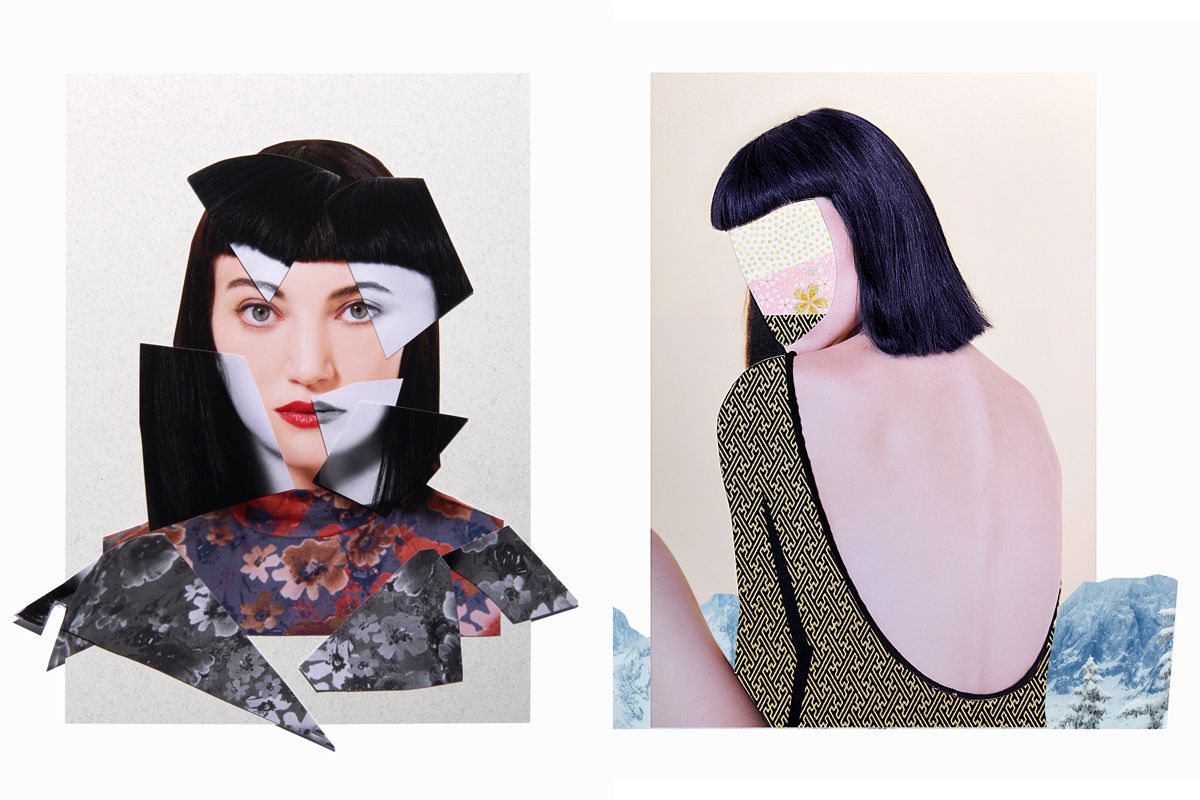
<p class="p">Eines der beliebtesten Collagen-Felder sind überarbeitete Modefotografien. Schneidet Teile des Gesichts oder des Körpers aus und übertragt sie auf Musterprints. Die klebt ihr anstelle der ursprünglichen Körperteile oder Outfits ein. Damit die Collagen-Kunst zu eurer Einrichtung passt, könnt ihr Reste von eurer Tapete einbauen.</p>


<figure class="wp-block-embed is-type-rich is-provider-instagram wp-block-embed-instagram"><div class="wp-block-embed__wrapper">
<blockquote class="instagram-media cmplazyload" data-instgrm-captioned data-instgrm-permalink="https://www.instagram.com/p/CCEN6_JAJsB/?utm_source=ig_embed&;utm_campaign=loading" data-instgrm-version="14" style=" background:#FFF; border:0; border-radius:3px; box-shadow:0 0 1px 0 rgba(0,0,0,0.5),0 1px 10px 0 rgba(0,0,0,0.15); margin: 1px; max-width:658px; min-width:326px; padding:0; width:99.375%; width:-webkit-calc(100% - 2px); width:calc(100% - 2px);" data-cmp-vendor="s14" data-cmp-hide="1" class="cmplazyload"><div style="padding:16px;"> <a href="https://www.instagram.com/p/CCEN6_JAJsB/?utm_source=ig_embed&;utm_campaign=loading" style=" background:#FFFFFF; line-height:0; padding:0 0; text-align:center; text-decoration:none; width:100%;" target="_blank"> <div style=" display: flex; flex-direction: row; align-items: center;"> <div style="background-color: #F4F4F4; border-radius: 50%; flex-grow: 0; height: 40px; margin-right: 14px; width: 40px;"></div> <div style="display: flex; flex-direction: column; flex-grow: 1; justify-content: center;"> <div style=" background-color: #F4F4F4; border-radius: 4px; flex-grow: 0; height: 14px; margin-bottom: 6px; width: 100px;"></div> <div style=" background-color: #F4F4F4; border-radius: 4px; flex-grow: 0; height: 14px; width: 60px;"></div></div></div><div style="padding: 19% 0;"></div> <div style="display:block; height:50px; margin:0 auto 12px; width:50px;"><svg width="50px" height="50px" viewBox="0 0 60 60" version="1.1" xmlns="https://www.w3.org/2000/svg" xmlns:xlink="https://www.w3.org/1999/xlink"><g stroke="none" stroke-width="1" fill="none" fill-rule="evenodd"><g transform="translate(-511.000000, -20.000000)" fill="#000000"><g><path d="M556.869,30.41 C554.814,30.41 553.148,32.076 553.148,34.131 C553.148,36.186 554.814,37.852 556.869,37.852 C558.924,37.852 560.59,36.186 560.59,34.131 C560.59,32.076 558.924,30.41 556.869,30.41 M541,60.657 C535.114,60.657 530.342,55.887 530.342,50 C530.342,44.114 535.114,39.342 541,39.342 C546.887,39.342 551.658,44.114 551.658,50 C551.658,55.887 546.887,60.657 541,60.657 M541,33.886 C532.1,33.886 524.886,41.1 524.886,50 C524.886,58.899 532.1,66.113 541,66.113 C549.9,66.113 557.115,58.899 557.115,50 C557.115,41.1 549.9,33.886 541,33.886 M565.378,62.101 C565.244,65.022 564.756,66.606 564.346,67.663 C563.803,69.06 563.154,70.057 562.106,71.106 C561.058,72.155 560.06,72.803 558.662,73.347 C557.607,73.757 556.021,74.244 553.102,74.378 C549.944,74.521 548.997,74.552 541,74.552 C533.003,74.552 532.056,74.521 528.898,74.378 C525.979,74.244 524.393,73.757 523.338,73.347 C521.94,72.803 520.942,72.155 519.894,71.106 C518.846,70.057 518.197,69.06 517.654,67.663 C517.244,66.606 516.755,65.022 516.623,62.101 C516.479,58.943 516.448,57.996 516.448,50 C516.448,42.003 516.479,41.056 516.623,37.899 C516.755,34.978 517.244,33.391 517.654,32.338 C518.197,30.938 518.846,29.942 519.894,28.894 C520.942,27.846 521.94,27.196 523.338,26.654 C524.393,26.244 525.979,25.756 528.898,25.623 C532.057,25.479 533.004,25.448 541,25.448 C548.997,25.448 549.943,25.479 553.102,25.623 C556.021,25.756 557.607,26.244 558.662,26.654 C560.06,27.196 561.058,27.846 562.106,28.894 C563.154,29.942 563.803,30.938 564.346,32.338 C564.756,33.391 565.244,34.978 565.378,37.899 C565.522,41.056 565.552,42.003 565.552,50 C565.552,57.996 565.522,58.943 565.378,62.101 M570.82,37.631 C570.674,34.438 570.167,32.258 569.425,30.349 C568.659,28.377 567.633,26.702 565.965,25.035 C564.297,23.368 562.623,22.342 560.652,21.575 C558.743,20.834 556.562,20.326 553.369,20.18 C550.169,20.033 549.148,20 541,20 C532.853,20 531.831,20.033 528.631,20.18 C525.438,20.326 523.257,20.834 521.349,21.575 C519.376,22.342 517.703,23.368 516.035,25.035 C514.368,26.702 513.342,28.377 512.574,30.349 C511.834,32.258 511.326,34.438 511.181,37.631 C511.035,40.831 511,41.851 511,50 C511,58.147 511.035,59.17 511.181,62.369 C511.326,65.562 511.834,67.743 512.574,69.651 C513.342,71.625 514.368,73.296 516.035,74.965 C517.703,76.634 519.376,77.658 521.349,78.425 C523.257,79.167 525.438,79.673 528.631,79.82 C531.831,79.965 532.853,80.001 541,80.001 C549.148,80.001 550.169,79.965 553.369,79.82 C556.562,79.673 558.743,79.167 560.652,78.425 C562.623,77.658 564.297,76.634 565.965,74.965 C567.633,73.296 568.659,71.625 569.425,69.651 C570.167,67.743 570.674,65.562 570.82,62.369 C570.966,59.17 571,58.147 571,50 C571,41.851 570.966,40.831 570.82,37.631"></path></g></g></g></svg></div><div style="padding-top: 8px;"> <div style=" color:#3897f0; font-family:Arial,sans-serif; font-size:14px; font-style:normal; font-weight:550; line-height:18px;">View this post on Instagram</div></div><div style="padding: 12.5% 0;"></div> <div style="display: flex; flex-direction: row; margin-bottom: 14px; align-items: center;"><div> <div style="background-color: #F4F4F4; border-radius: 50%; height: 12.5px; width: 12.5px; transform: translateX(0px) translateY(7px);"></div> <div style="background-color: #F4F4F4; height: 12.5px; transform: rotate(-45deg) translateX(3px) translateY(1px); width: 12.5px; flex-grow: 0; margin-right: 14px; margin-left: 2px;"></div> <div style="background-color: #F4F4F4; border-radius: 50%; height: 12.5px; width: 12.5px; transform: translateX(9px) translateY(-18px);"></div></div><div style="margin-left: 8px;"> <div style=" background-color: #F4F4F4; border-radius: 50%; flex-grow: 0; height: 20px; width: 20px;"></div> <div style=" width: 0; height: 0; border-top: 2px solid transparent; border-left: 6px solid #f4f4f4; border-bottom: 2px solid transparent; transform: translateX(16px) translateY(-4px) rotate(30deg)"></div></div><div style="margin-left: auto;"> <div style=" width: 0px; border-top: 8px solid #F4F4F4; border-right: 8px solid transparent; transform: translateY(16px);"></div> <div style=" background-color: #F4F4F4; flex-grow: 0; height: 12px; width: 16px; transform: translateY(-4px);"></div> <div style=" width: 0; height: 0; border-top: 8px solid #F4F4F4; border-left: 8px solid transparent; transform: translateY(-4px) translateX(8px);"></div></div></div> <div style="display: flex; flex-direction: column; flex-grow: 1; justify-content: center; margin-bottom: 24px;"> <div style=" background-color: #F4F4F4; border-radius: 4px; flex-grow: 0; height: 14px; margin-bottom: 6px; width: 224px;"></div> <div style=" background-color: #F4F4F4; border-radius: 4px; flex-grow: 0; height: 14px; width: 144px;"></div></div></a><p style=" color:#c9c8cd; font-family:Arial,sans-serif; font-size:14px; line-height:17px; margin-bottom:0; margin-top:8px; overflow:hidden; padding:8px 0 7px; text-align:center; text-overflow:ellipsis; white-space:nowrap;"><a href="https://www.instagram.com/p/CCEN6_JAJsB/?utm_source=ig_embed&;utm_campaign=loading" style=" color:#c9c8cd; font-family:Arial,sans-serif; font-size:14px; font-style:normal; font-weight:normal; line-height:17px; text-decoration:none;" target="_blank">A post shared by Frank Moth Art (@frankmoth)</a></p></div></blockquote><script async data-cmp-src="//platform.instagram.com/en_US/embeds.js" src="about:blank" data-cmp-vendor="s14" data-cmp-preview="520x200" class="cmplazyload"></script>
</div></figure>


<p class="p">Statt unbekannter Models lassen sich auf dieselbe Weise Fotos von euch oder euren Freunden bearbeiten. Solche Collagen im Patchwork-Stil mit verfremdeten Gesichtern sind eine schöne Geschenkidee oder peppen eure Socia-Media-Seite als kreatives Profilbild auf.<br>
<br>
<strong>Lesetipp: </strong><a href="/wohnen/selfie-tipps-s4003031.html">Selfie-Tipps: So gelingt euch das perfekte Selbstportrait</a></p>


<h2 class="title wp-block-heading" id="title_13">7. Collagen-Idee: Geometrische Muster als Rahmen</h2>


<p class="p">Fortgeschrittene Collage-Künstler können sich daran versuchen, ihre Bildercollage in eine neue Form zu bringen. Eine geometrische, um genau zu sein. Kreise, Rauten und Dreiecke sind aktuell nicht aus dem Interior- und Modebereich wegzudenken. Warum also nicht einfach Teile der Collage in abstrakte Musterrahmen einbetten und so vom Rest abgrenzen?</p>


<figure class="wp-block-embed is-type-rich is-provider-instagram wp-block-embed-instagram"><div class="wp-block-embed__wrapper">
<blockquote class="instagram-media cmplazyload" data-instgrm-captioned data-instgrm-permalink="https://www.instagram.com/p/CDAi8vpl7NJ/?utm_source=ig_embed&;utm_campaign=loading" data-instgrm-version="14" style=" background:#FFF; border:0; border-radius:3px; box-shadow:0 0 1px 0 rgba(0,0,0,0.5),0 1px 10px 0 rgba(0,0,0,0.15); margin: 1px; max-width:658px; min-width:326px; padding:0; width:99.375%; width:-webkit-calc(100% - 2px); width:calc(100% - 2px);" data-cmp-vendor="s14" data-cmp-hide="1" class="cmplazyload"><div style="padding:16px;"> <a href="https://www.instagram.com/p/CDAi8vpl7NJ/?utm_source=ig_embed&;utm_campaign=loading" style=" background:#FFFFFF; line-height:0; padding:0 0; text-align:center; text-decoration:none; width:100%;" target="_blank"> <div style=" display: flex; flex-direction: row; align-items: center;"> <div style="background-color: #F4F4F4; border-radius: 50%; flex-grow: 0; height: 40px; margin-right: 14px; width: 40px;"></div> <div style="display: flex; flex-direction: column; flex-grow: 1; justify-content: center;"> <div style=" background-color: #F4F4F4; border-radius: 4px; flex-grow: 0; height: 14px; margin-bottom: 6px; width: 100px;"></div> <div style=" background-color: #F4F4F4; border-radius: 4px; flex-grow: 0; height: 14px; width: 60px;"></div></div></div><div style="padding: 19% 0;"></div> <div style="display:block; height:50px; margin:0 auto 12px; width:50px;"><svg width="50px" height="50px" viewBox="0 0 60 60" version="1.1" xmlns="https://www.w3.org/2000/svg" xmlns:xlink="https://www.w3.org/1999/xlink"><g stroke="none" stroke-width="1" fill="none" fill-rule="evenodd"><g transform="translate(-511.000000, -20.000000)" fill="#000000"><g><path d="M556.869,30.41 C554.814,30.41 553.148,32.076 553.148,34.131 C553.148,36.186 554.814,37.852 556.869,37.852 C558.924,37.852 560.59,36.186 560.59,34.131 C560.59,32.076 558.924,30.41 556.869,30.41 M541,60.657 C535.114,60.657 530.342,55.887 530.342,50 C530.342,44.114 535.114,39.342 541,39.342 C546.887,39.342 551.658,44.114 551.658,50 C551.658,55.887 546.887,60.657 541,60.657 M541,33.886 C532.1,33.886 524.886,41.1 524.886,50 C524.886,58.899 532.1,66.113 541,66.113 C549.9,66.113 557.115,58.899 557.115,50 C557.115,41.1 549.9,33.886 541,33.886 M565.378,62.101 C565.244,65.022 564.756,66.606 564.346,67.663 C563.803,69.06 563.154,70.057 562.106,71.106 C561.058,72.155 560.06,72.803 558.662,73.347 C557.607,73.757 556.021,74.244 553.102,74.378 C549.944,74.521 548.997,74.552 541,74.552 C533.003,74.552 532.056,74.521 528.898,74.378 C525.979,74.244 524.393,73.757 523.338,73.347 C521.94,72.803 520.942,72.155 519.894,71.106 C518.846,70.057 518.197,69.06 517.654,67.663 C517.244,66.606 516.755,65.022 516.623,62.101 C516.479,58.943 516.448,57.996 516.448,50 C516.448,42.003 516.479,41.056 516.623,37.899 C516.755,34.978 517.244,33.391 517.654,32.338 C518.197,30.938 518.846,29.942 519.894,28.894 C520.942,27.846 521.94,27.196 523.338,26.654 C524.393,26.244 525.979,25.756 528.898,25.623 C532.057,25.479 533.004,25.448 541,25.448 C548.997,25.448 549.943,25.479 553.102,25.623 C556.021,25.756 557.607,26.244 558.662,26.654 C560.06,27.196 561.058,27.846 562.106,28.894 C563.154,29.942 563.803,30.938 564.346,32.338 C564.756,33.391 565.244,34.978 565.378,37.899 C565.522,41.056 565.552,42.003 565.552,50 C565.552,57.996 565.522,58.943 565.378,62.101 M570.82,37.631 C570.674,34.438 570.167,32.258 569.425,30.349 C568.659,28.377 567.633,26.702 565.965,25.035 C564.297,23.368 562.623,22.342 560.652,21.575 C558.743,20.834 556.562,20.326 553.369,20.18 C550.169,20.033 549.148,20 541,20 C532.853,20 531.831,20.033 528.631,20.18 C525.438,20.326 523.257,20.834 521.349,21.575 C519.376,22.342 517.703,23.368 516.035,25.035 C514.368,26.702 513.342,28.377 512.574,30.349 C511.834,32.258 511.326,34.438 511.181,37.631 C511.035,40.831 511,41.851 511,50 C511,58.147 511.035,59.17 511.181,62.369 C511.326,65.562 511.834,67.743 512.574,69.651 C513.342,71.625 514.368,73.296 516.035,74.965 C517.703,76.634 519.376,77.658 521.349,78.425 C523.257,79.167 525.438,79.673 528.631,79.82 C531.831,79.965 532.853,80.001 541,80.001 C549.148,80.001 550.169,79.965 553.369,79.82 C556.562,79.673 558.743,79.167 560.652,78.425 C562.623,77.658 564.297,76.634 565.965,74.965 C567.633,73.296 568.659,71.625 569.425,69.651 C570.167,67.743 570.674,65.562 570.82,62.369 C570.966,59.17 571,58.147 571,50 C571,41.851 570.966,40.831 570.82,37.631"></path></g></g></g></svg></div><div style="padding-top: 8px;"> <div style=" color:#3897f0; font-family:Arial,sans-serif; font-size:14px; font-style:normal; font-weight:550; line-height:18px;">View this post on Instagram</div></div><div style="padding: 12.5% 0;"></div> <div style="display: flex; flex-direction: row; margin-bottom: 14px; align-items: center;"><div> <div style="background-color: #F4F4F4; border-radius: 50%; height: 12.5px; width: 12.5px; transform: translateX(0px) translateY(7px);"></div> <div style="background-color: #F4F4F4; height: 12.5px; transform: rotate(-45deg) translateX(3px) translateY(1px); width: 12.5px; flex-grow: 0; margin-right: 14px; margin-left: 2px;"></div> <div style="background-color: #F4F4F4; border-radius: 50%; height: 12.5px; width: 12.5px; transform: translateX(9px) translateY(-18px);"></div></div><div style="margin-left: 8px;"> <div style=" background-color: #F4F4F4; border-radius: 50%; flex-grow: 0; height: 20px; width: 20px;"></div> <div style=" width: 0; height: 0; border-top: 2px solid transparent; border-left: 6px solid #f4f4f4; border-bottom: 2px solid transparent; transform: translateX(16px) translateY(-4px) rotate(30deg)"></div></div><div style="margin-left: auto;"> <div style=" width: 0px; border-top: 8px solid #F4F4F4; border-right: 8px solid transparent; transform: translateY(16px);"></div> <div style=" background-color: #F4F4F4; flex-grow: 0; height: 12px; width: 16px; transform: translateY(-4px);"></div> <div style=" width: 0; height: 0; border-top: 8px solid #F4F4F4; border-left: 8px solid transparent; transform: translateY(-4px) translateX(8px);"></div></div></div> <div style="display: flex; flex-direction: column; flex-grow: 1; justify-content: center; margin-bottom: 24px;"> <div style=" background-color: #F4F4F4; border-radius: 4px; flex-grow: 0; height: 14px; margin-bottom: 6px; width: 224px;"></div> <div style=" background-color: #F4F4F4; border-radius: 4px; flex-grow: 0; height: 14px; width: 144px;"></div></div></a><p style=" color:#c9c8cd; font-family:Arial,sans-serif; font-size:14px; line-height:17px; margin-bottom:0; margin-top:8px; overflow:hidden; padding:8px 0 7px; text-align:center; text-overflow:ellipsis; white-space:nowrap;"><a href="https://www.instagram.com/p/CDAi8vpl7NJ/?utm_source=ig_embed&;utm_campaign=loading" style=" color:#c9c8cd; font-family:Arial,sans-serif; font-size:14px; font-style:normal; font-weight:normal; line-height:17px; text-decoration:none;" target="_blank">A post shared by Natasha Chomko (@postwook)</a></p></div></blockquote><script async data-cmp-src="//platform.instagram.com/en_US/embeds.js" src="about:blank" data-cmp-vendor="s14" data-cmp-preview="520x200" class="cmplazyload"></script>
</div></figure>


<p class="p">Die fließenden Übergänge zwischen dem Inneren und Äußeren des Kreises sind wie hier im Bild ziemlich sicher mit dem Computer geschaffen worden. Aber trotzdem kann man sich dieses Prinzip auch beim händischen Basteln zu Nutze machen. Man soll sich ja immer hohe Ziele stecken, nicht wahr?<br>
<br>
* <a href="/sp/hilfe_faq_affiliate_marketing/index.html">Affiliate Link</a></p>

Collagen-Kunst: Anleitung für coole DIY-Bilder
Neues Hobby gesucht? Mit Collagen-Kunst lassen sich kreative Bilder entwerfen. Hier kommen die besten Ideen und Experten-Tipps.